
Exam style questions across every AFD-200 domain
Last Update 2 days ago
Total Questions : 49
Start with our free AFD-200 practice questions, carefully crafted to mirror the domains, phrasing, and difficulty of the real Flutter Application Development exam. Each AFD-200 exam question comes with a detailed rationale that explains not just which answer is correct but why the others fall short. That's how concepts stick. Use the free set to benchmark yourself: identify your Android weak domains, see where you're losing marks, and build a focused study plan in minutes.

This Flutter widget is used to toggle the on/off state of a single setting.
Which of the following choices represents this definition?
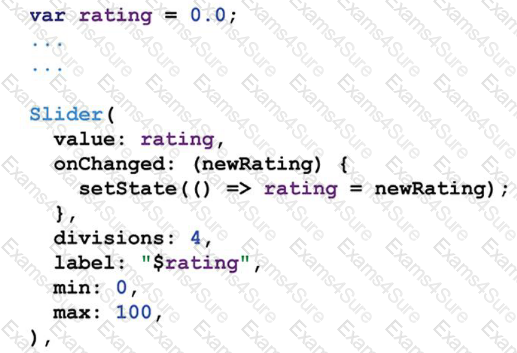
The code in this image is to add a Slider widget to a Flutter app interface.
The divisions property value is 4. What does that mean?
presentation [The image of this question includes a Flutter app interface run result as it appears on Android and on iOS emulators. When the app user taps the button on the app title bar, he/she will get a menu with some items.
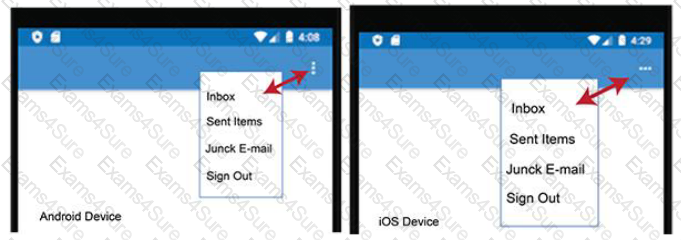
Which of the following Flutter widgets is used to create this type of buttons ?
The image in this question is a part of Flutter app interface which includes four TextFields. When the app user types anything in the password TextField, all the characters in the text field are replaced with stars to hide the user's passwor
D.
To do this, you should add a specific property to the password TextFieldwidget.
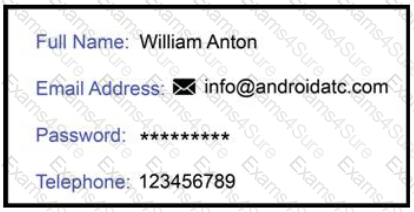
Which of the following choices is the property and what property value should one add to the password
TextField widget to get this type of secure input ?
Check the image in this question first, then assume that you added this Dart code in a Flutter app to create three radio buttons to your app interface. However; you got an error message. There is something that is still missing in this code.
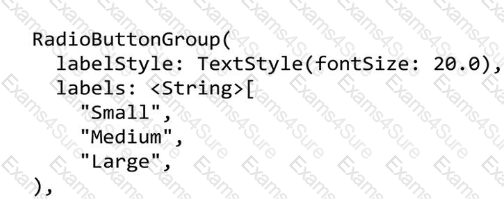
What should you do to correct the error in this code?
Flutter widgets are the basic building blocks of a Flutter user interface. Almost everything in Flutter app is a widget such as images, icons, texts, menus, buttons, row, column etc.
The Container is a Flutter widget that allows you to customize, compose, decorate and position its child
widget.