

Spring Sale Limited Time 65% Discount Offer - Ends in 0d 00h 00m 00s - Coupon code: 65pass65

210-015 VCE Vblock System Deployment and Implementation – Virtualization is now Stable and With Pass Result | Test Your Knowledge for Free

Exams4sure Dumps

210-015 Practice Questions

VCE Vblock System Deployment and Implementation – Virtualization

Last Update 3 days ago
Total Questions : 93

Dive into our fully updated and stable 210-015 practice test platform, featuring all the latest VCE-CIMIE exam questions added this week. Our preparation tool is more than just a VCE study aid; it's a strategic advantage.

Our free VCE-CIMIE practice questions crafted to reflect the domains and difficulty of the actual exam. The detailed rationales explain the 'why' behind each answer, reinforcing key concepts about 210-015. Use this test to pinpoint which areas you need to focus your study on.

210-015 PDF

210-015 PDF (Printable)
$43.75
$124.99

210-015 Testing Engine

210-015 PDF (Printable)
$50.75
$144.99

210-015 PDF + Testing Engine

210-015 PDF (Printable)
$63.7
$181.99
Question # 11

Which VNX drive type should be used for ESXi boot LUNs?

Options:

A.  

largest available NL-SAS

B.  

largest available SAS

C.  

smallest available SAS

D.  

smallest available EFD

Discussion 0
Question # 12

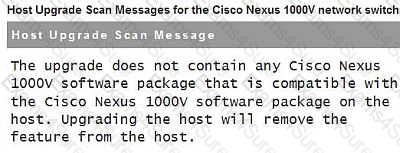
Click the Exhibit button.

After scanning a host for compliance in VMware Update Manager you receive the message shown in the exhibit.
Question # 12

What is the reason for the message?

Options:

A.  

The VEM VIB in the ESXi 5.x upgrade image is not compatible with the version of the VSM.

B.  

A VEM VIB is not available in the ESXi 5.x upgrade image.

C.  

The host and the image do not contain VEM VIBs, but the host is still listed in vCenter Server as managed by Cisco Nexus 1000V.

D.  

There was a problem with determining compatibility between the VEM VIB in the ESXi 5.x upgrade image and the VSM.

Discussion 0
Question # 13

Overnight several virtual machines have triggered alarms for guest memory usage.

What are the proper steps to acknowledge the alarms while investigating the cause?

Options:

A.  

Locate the relevant alarms and reset them.

B.  

Notify your monitoring team to disable all virtual machine monitoring; reboot all affected virtual machines and manually monitor their memory usage for the next 60 minutes.

C.  

Place all affected virtual machines into suspend until the alarms clear on their own.

D.  

From the Status Bar click the alarm button; select Acknowledge the Alarm.

Discussion 0
Get 210-015 dumps and pass your exam in 24 hours!

Free Exams Sample Questions


