

Pre-Winter Sale Limited Time 65% Discount Offer - Ends in 0d 00h 00m 00s - Coupon code: 65pass65

Free Associate Certification - InsuranceSuite Developer - Mammoth Proctored Exam Practice Questions

Exams4sure Dumps

Exam style questions across every InsuranceSuite-Developer domain

Last Update 1 day ago
Total Questions : 150

Start with our free InsuranceSuite-Developer practice questions, carefully crafted to mirror the domains, phrasing, and difficulty of the real Guidewire Certified Associate exam. Each InsuranceSuite-Developer exam question comes with a detailed rationale that explains not just which answer is correct but why the others fall short. That's how concepts stick. Use the free set to benchmark yourself: identify your Guidewire weak domains, see where you're losing marks, and build a focused study plan in minutes.

InsuranceSuite-Developer PDF

InsuranceSuite-Developer PDF (Printable)
$54.25
$154.99

InsuranceSuite-Developer Testing Engine

InsuranceSuite-Developer PDF (Printable)
$59.5
$169.99

InsuranceSuite-Developer PDF + Testing Engine

InsuranceSuite-Developer PDF (Printable)
$74.55
$212.99
Question # 41

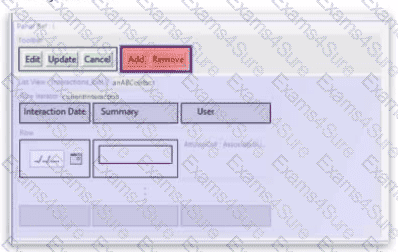
The Panel Ref in the screenshot below displays a List View with a toolbar. Add and Remove buttons have been added to the toolbar, but they appear in red, indicating an error. The Row Iterator has toAdd and toRemove buttons correctly defined.
Question # 41

What needs to be configured to fix the error?

Options:

A.  

Set the toCrealeAndAdd property of the row iterator

B.  

Sel the addVisible and removeVisible properties of the Add and Remove buttons

C.  

Set the iterator property of the Add and Remove buttons

D.  

Set the Visible property of the row iterator

Discussion 0
Question # 42

A ListView shows contacts related to a Claim. When a user clicks the contact name in a text cell, the UI should open a Worksheet showing details of that contact. The elementName property in the row iterator is currentContact. Which is the correct approach?

Options:

A.  

Set the Action property on the atomic widget to include ContactWS(currentContact)

B.  

Set the actionAvailable property on the atomic widget to ContactWS.push(currentContact)

C.  

Set the Action property on the atomic widget to ContactWS.goInWorksheet(currentContact)

D.  

Set the Action property on the atomic widget to ContactWS.goInWorkspace(currentContact)

Discussion 0
Question # 43

Given the following Gosu method definition:

function calculateDiscount( amount : Decimal ) : amount {

if ( amount > 1000 ) {

return amount * 0.10

}

else {

return amount * 0.05

}

}

Identify the two errors in this Gosu method definition.

Options:

A.  

The variable name amount is not descriptive.

B.  

The comparison amount > 1000 is missing parentheses.

C.  

The return type amount is incorrect.

D.  

The method name calculateDiscount does not follow camel case.

E.  

The variable amount is not initialized.

F.  

The return type should be Decimal.

Discussion 0
Question # 44

An insurer wants to prevent US phone numbers from containing the string " 555 " in the prefix (digits 4-6). In addition to a test for country, which validation expression will accomplish this?

Options:

A.  

((phoneOwner.PhoneFields.NationalSubscriberNumber[4..6] as String) == ' 555 ' ) ? DisplayKey.get( " BadPhoneNumber " ) : true

B.  

((phoneOwner.PhoneFields.NationalSubscriberNumber as String).contains( ' 555 ' )) ? DisplayKey.get( " BadPhoneNumber " ) : null

C.  

((phoneOwner.PhoneFields.NationalSubscriberNumber[3..5] as String).equals( ' 555 ' )) ? DisplayKey.get( " BadPhoneNumber " ) : null

D.  

(phoneOwner.PhoneFields.NationalSubscriberNumber[3..5].equals( ' 555 ' )) ? DisplayKey.get( " BadPhoneNumber " ) : true

Discussion 0
Question # 45

An insurer would like to include the Law Firm Specialty as part of the Law Firm ' s name whenever the name is displayed in a single widget. Which configurations follow best practices to meet this requirement?


Options:

A.  

Modify the Law Firm entity ' s displayname property to include the law firm ' s specialty.

B.  

Implement a getter method on the entity to return a formatted name that includes the law firm ' s specialty.

C.  

Place a Text Input widget in the ListView ' s Row container for the law firm ' s specialty.

D.  

Configure the entity name for the Law Firm entity to include law firm ' s specialty.

E.  

Add a custom field to the entity to store a concatenated display string.

F.  

Use a dynamic field to generate the display string to include the law firm ' s specialty.

G.  

Place a Text Cell widget in the ListView ' s Row container for the law firm ' s specialty.

Discussion 0

Free Exams Sample Questions
