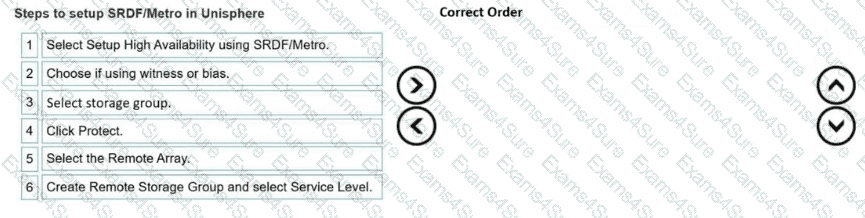
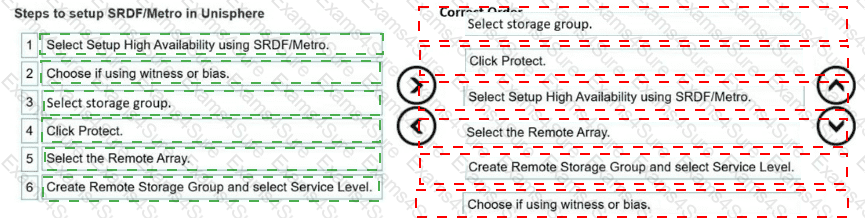
Correct Order:
Select storage group.
Click Protect.
Select Setup High Availability using SRDF/Metro.
Select the Remote Array.
Create Remote Storage Group and select Service Level.
Choose if using witness or bias.
In Unisphere for PowerMax, configuring high-availability replication via Symmetrix Remote Data Facility (SRDF/Metro) follows a structured, wizard-driven provisioning workflow designed to maintain data consistency. The process begins in the storage management dashboard, where the administrator navigates to the block storage view to Select storage group representing the production workload. Once the specific source group is highlighted, the orchestration is initiated by clicking Protect , which launches the specialized protection configuration dialog.
Within the wizard interface, the first decision block requires defining the protection topology, where the architect must specifically Select Setup High Availability using SRDF/Metro to establish an active-active replication framework rather than traditional asynchronous or synchronous links. Following topology selection, the wizard prompts for target system pathing, requiring the architect to Select the Remote Array that will host the secondary copy. Next, the logical target environment is defined by choosing to Create Remote Storage Group and select Service Level , which ensures matching capacity boundaries and performance expectations on the target array. Finally, to ensure proper split-brain arbitration and avoid data drift during path failures, the architect must navigate the policy options to Choose if using witness or bias as the high-availability management mechanism before finalizing and executing the configuration.
References/Topics: Dell PowerMax Design Course Guide, Unisphere for PowerMax Replication Management, SRDF/Metro Active-Active Protection Workflow, Storage Group Orchestration.