
MD-102 Practice Questions
Endpoint Administrator
Last Update 3 days ago
Total Questions : 392
Dive into our fully updated and stable MD-102 practice test platform, featuring all the latest Microsoft 365 Certified: Endpoint Administrator Associate exam questions added this week. Our preparation tool is more than just a Microsoft study aid; it's a strategic advantage.
Our free Microsoft 365 Certified: Endpoint Administrator Associate practice questions crafted to reflect the domains and difficulty of the actual exam. The detailed rationales explain the 'why' behind each answer, reinforcing key concepts about MD-102. Use this test to pinpoint which areas you need to focus your study on.

You have devices that are not rooted enrolled in Microsoft Intune as shown in the following table.
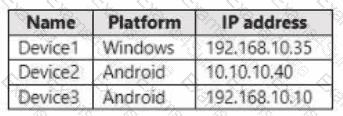
The devices are members of a group named Group1.
In Intune, you create a device compliance location that has the following configurations:
• Name: Network1
• IPv4 range: 192.168.0.0/16
In Intune. you create a device compliance policy for the Android platform. The policy has the following configurations:
• Name: Policy1
• Device health: Rooted devices: Block
• Locations: Location: Network1
• Mark device noncompliant: Immediately
• Assigned: Group1
The Intune device compliance policy has the following configurations:
• Mark devices with no compliance policy assigned as: Compliant
• Enhanced jailbreak detection: Enabled
• Compliance status validity period (days): 20
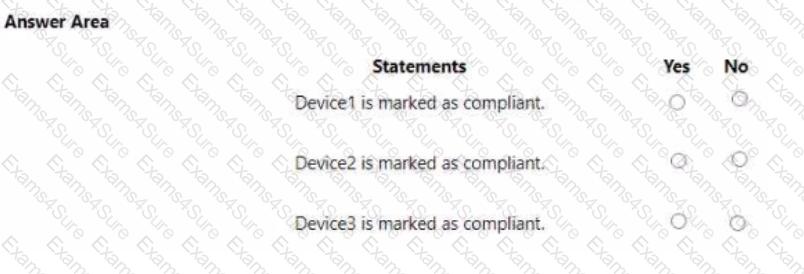
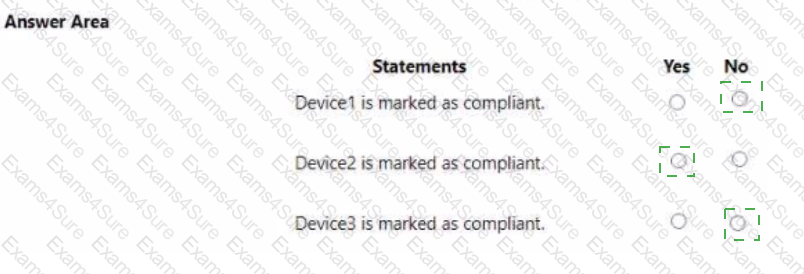
For each of the following statements, select Yes if the statement is true. Otherwise, select No.
NOTE: Each correct selection is worth one point.
You have a Microsoft Entra tenant that contains the devices shown in the following table.
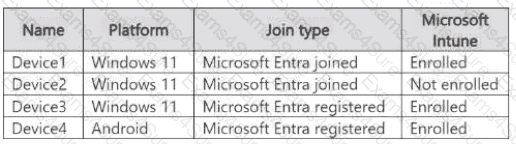
On which devices can you implement Endpoint Privilege Management (EPM)?
Note: This question is part of a series of questions that present the same scenario. Each question in the series contains a unique solution that might meet the stated goals. Some question sets might have more than one correct solution, while others might not have a correct solution.
After you answer a question in this section, you will NOT be able to return to it. As a result, these questions will not appear in the review screen.
Your company has an Azure AD tenant named contoso.com that contains several Windows 10 devices.
When you join new Windows 10 devices to contoso.com, users are prompted to set up a four-digit pin.
You need to ensure that the users are prompted to set up a six-digit pin when they join the Windows 10 devices to contoso.com.
Solution: From the Microsoft Entra admin center, you configure the Authentication methods.
Does this meet the goal?
You have a Microsoft 365 E5 subscription.
All devices are enrolled in Microsoft Intune.
You need to ensure that devices that have NOT checked in for 30 days are deleted from intune.
What should you configure from the Microsoft Intune admin center?
You have devices enrolled in Microsoft Intune as shown in the following table.
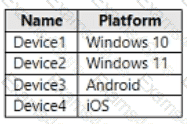
On which devices can you apply app configuration policies?
-
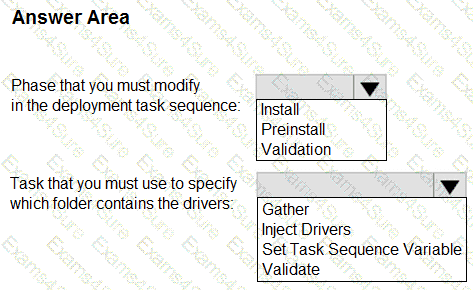
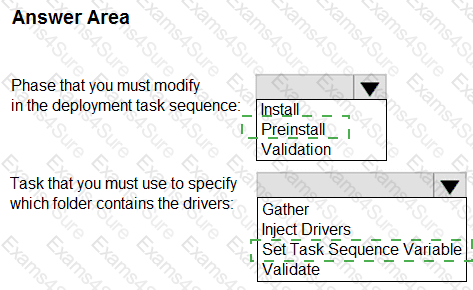
You manage a Microsoft Deployment Toolkit (MDT) deployment share named DS1. DS1 contains an Out-of-Box Drivers folder named Windows 11 x64 that has subfolders in the format of {make name}\{model name}.
You need to modify a deployment task sequence to ensure that all the drivers in the folder that match the make and model of the computers are installed without using PnP detection or selection profiles.
What should you do? To answer, select the appropriate options in the answer area.
NOTE: Each correct selection is worth one point.
You have a Microsoft 365 E5 subscription.
You use Microsoft Intune to manage all devices.
You need to prepare a Win32 app named App1.exe for deployment.
What should you do first?
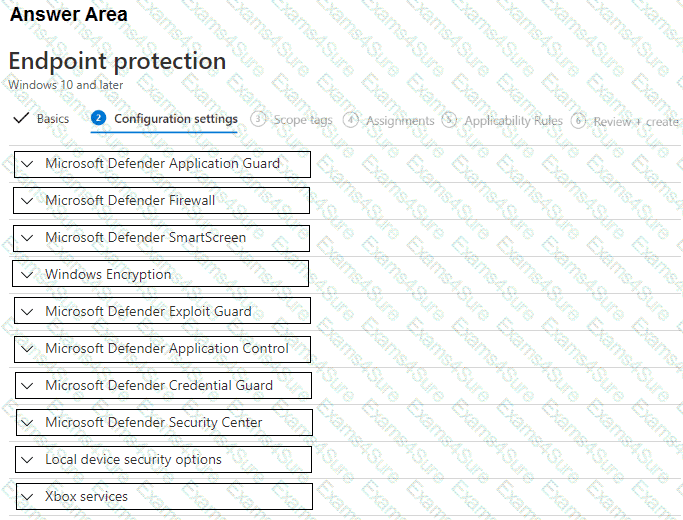
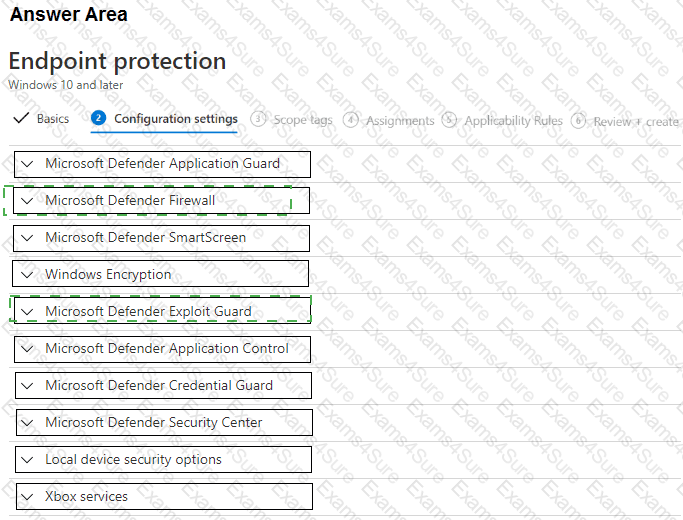
You have 200 computers that run Windows 10. The computers are joined to Microsoft Azure Active Directory (Azure AD) and enrolled in Microsoft Intune.
You need to configure an Intune device configuration profile to meet the following requirements:
Prevent Microsoft Office applications from launching child processes.
Block users from transferring files over FTP.
Which two settings should you configure in Endpoint protection? To answer, select the appropriate settings in the answer area.
NOTE: Each correct selection is worth one point.
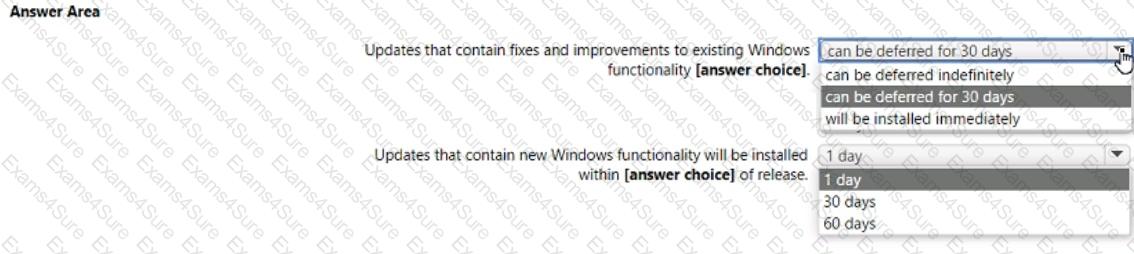
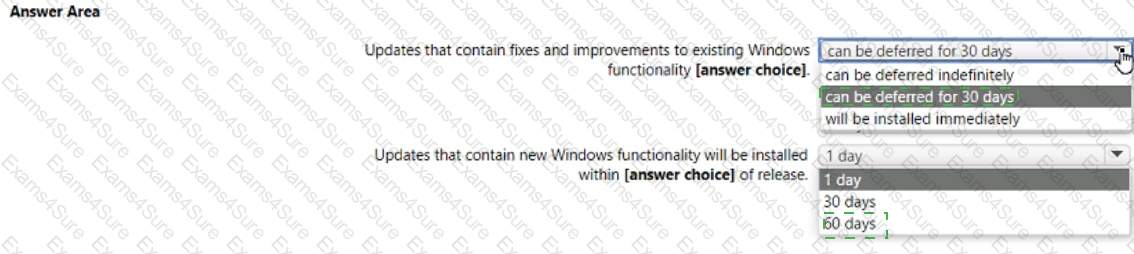
You have a Microsoft 365 E5 subscription.
You create a new update rings policy named Policy1 as shown in the following exhibit.
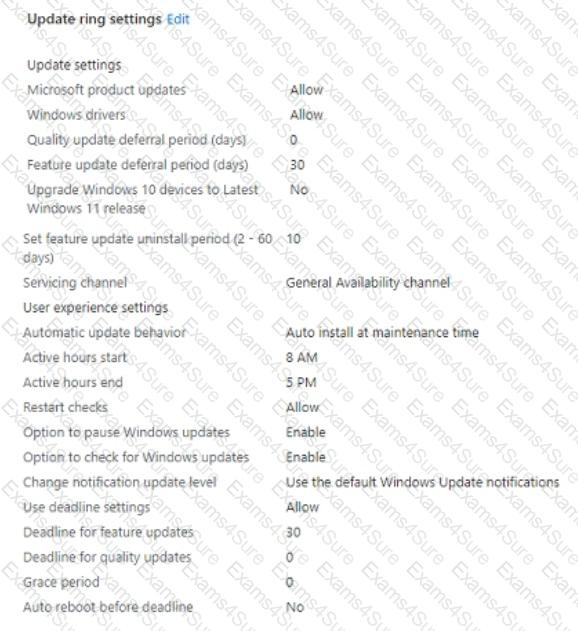
Use the drop-down menus to select the answer choice that completes each statement based on the information presented in the graphic.
NOTE: Each correct selection is worth one point,
You have an Azure AD tenant and 100 Windows 10 devices that are Azure AD joined and managed by using Microsoft Intune.
You need to configure Microsoft Defender Firewall and Microsoft Defender Antivirus on the devices. The solution must minimize administrative effort.
Which two actions should you perform? Each correct answer presents part of the solution.
NOTE: Each correct selection is worth one point.