Exam style questions across every Workday-Pro-Integrations domain
Last Update 3 days ago
Total Questions : 109
Start with our free Workday-Pro-Integrations practice questions, carefully crafted to mirror the domains, phrasing, and difficulty of the real Workday Integrations exam. Each Workday-Pro-Integrations exam question comes with a detailed rationale that explains not just which answer is correct but why the others fall short. That's how concepts stick. Use the free set to benchmark yourself: identify your Workday weak domains, see where you're losing marks, and build a focused study plan in minutes.

Refer to the following XML to answer the question below.
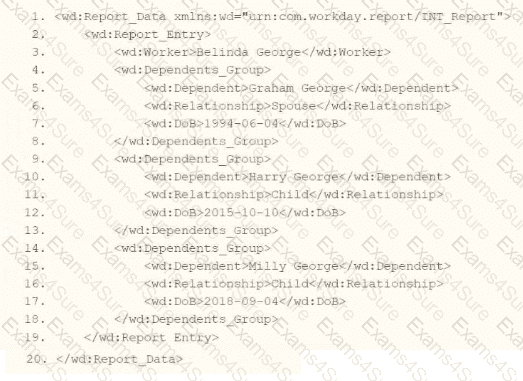
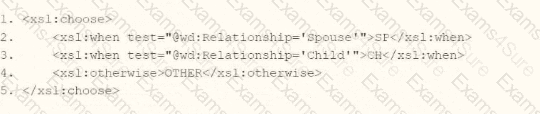
You are an integration developer and need to write XSLT to transform the output of an EIB which is using a web service enabled report to output worker data along with their dependents. You currently have a template which matches on wd:Dependents_Group to iterate over each dependent. Within the template which matches on wd:Dependents_Group you would like to output a relationship code by using an < xsl:choose > statement.
What XSLT syntax would be used to output SP when the dependent relationship is spouse, output CH when the dependent relationship is child, otherwise output OTHER?
Options:
A.

B.

C.
D.

You are creating an outbound connector using the Core Connector: Organization Outbound template. The vendor has provided the following requirements for how the data should appear in the output file.
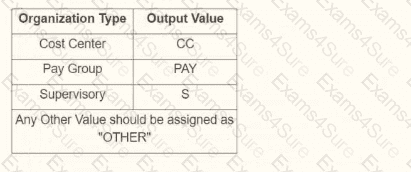
The vendor would also like to change the default document retention policy of 30 days to 7 days. What tasks do you need to use to configure this in your connector?
An external system needs a file containing data for recent compensation changes. They would like to receive a file routinely at 5 PM eastern standard time, excluding weekends. The file should show compensation changes since the last integration run.
What is the recurrence type of the integration schedule?
A calculated field used as a field override in a Connector is not appearing in the output. Assuming the field has a value, what could cause this to occur?
Refer to the scenario. You are configuring a Core Connector: Worker integration to extract worker demographic and contact information. The integration uses the Data Initialization Service (DIS) and must include worker fields such as name, address, and a calculated field identifying workers eligible for a phone allowance.
During a Full File test run, the output file is missing all address-related information, even though the Address Line Data, Municipality, Region, and Postal Code fields were configured in the Configure Integration Field Attributes step. You also confirmed that the Worker Personal Data Section is marked as Include in Output.
What should you do to resolve this issue?
The following XML code was generated through a RaaS that will be used in an EI
B.
What XSLT code snippet will output the number of dependents for each employee if a wd:Dependents_Group exists and output “This employee has 0 Dependents” if the wd:Dependents_Group does not exist?
What XSL component is required to execute valid transformation instructions in the XLST code?
You have been asked to create an integration using the Core Connector: Worker with DIS template. The vendor has requested that you only include employees who are based in the San Francisco area that are on leave.
How do you configure your integration so that only workers who meet the requirements are included in the output file?
Refer to the following scenario to answer the question below.
You have configured a Core Connector: Worker integration, which utilizes the following basic configuration:
• Integration field attributes are configured to output the Position Title and Business Title fields from the Position Data section.
• Integration Population Eligibility uses the field Is Manager which returns true if the worker holds a manager role.
• Transaction Log service has been configured to Subscribe to specific Transaction Types: Position Edit Event.
You launch your integration with the following date launch parameters (Date format of MM/DD/YYYY):
• As of Entry Moment: 05/25/2024 12:00:00 AM
• Effective Date: 05/25/2024
• Last Successful As of Entry Moment: 05/23/2024 12:00:00 AM
• Last Successful Effective Date: 05/23/2024
To test your integration, you made a change to a worker named Jeff Gordon who is not assigned to the manager role. You perform an Edit Position on Jeff Gordon and update their business title to a new value. Jeff Gordon ' s worker history shows the Edit Position Event as being successfully completed with an effective date of 05/24/2024 and an Entry Moment of 05/24/2024 07:58:53 AM however Jeff Gordon does not show up in your output.
What configuration element would have to be modified for the integration to include Jeff Gordon in the output?
Refer to the following XML and example transformed output to answer the question below.
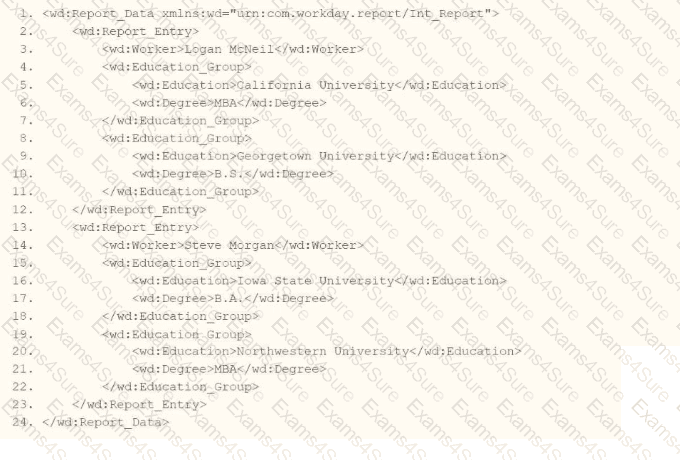
Example transformed wd:Report_Entry output;
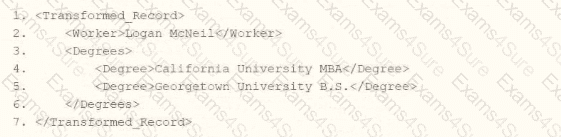
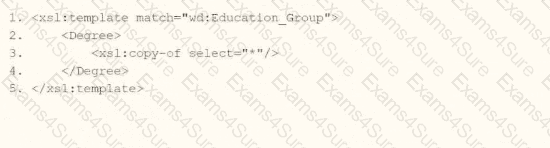
What is the XSLT syntax tor a template that matches on wd: Educationj3roup to produce the degree data in the above Transformed_Record example?
Options:
A.

B.
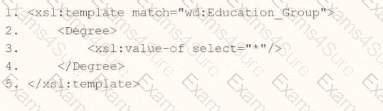
C.
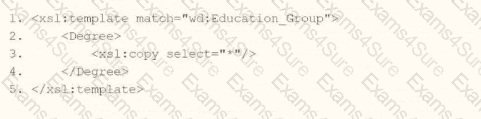
D.