Exam style questions across every Workday-Pro-Integrations domain
Last Update 1 day ago
Total Questions : 109
Start with our free Workday-Pro-Integrations practice questions, carefully crafted to mirror the domains, phrasing, and difficulty of the real Workday Integrations exam. Each Workday-Pro-Integrations exam question comes with a detailed rationale that explains not just which answer is correct but why the others fall short. That's how concepts stick. Use the free set to benchmark yourself: identify your Workday weak domains, see where you're losing marks, and build a focused study plan in minutes.

Refer to the following XML to answer the question below.
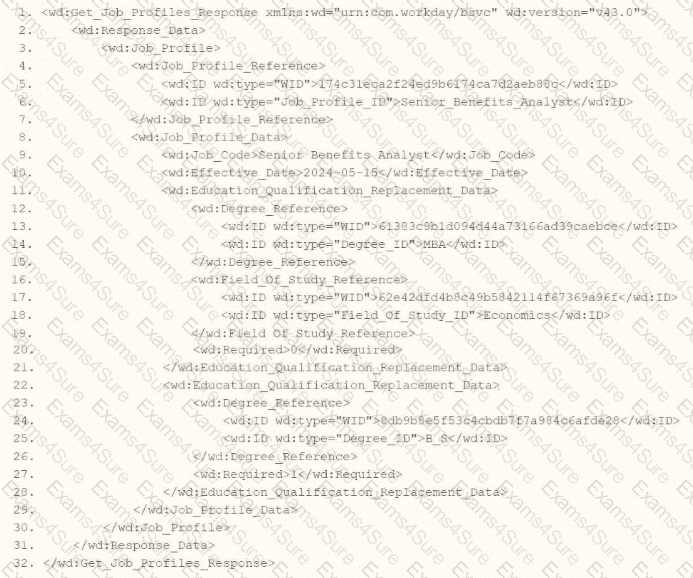
You are an integration developer and need to write XSLT to transform the output of an EIB which is making a request to the Get Job Profiles web service operation. The root template of your XSLT matches on the < wd:Get_Job_Profiles_Response > element. This root template then applies templates against < wd:Job_Profile > . What XPath syntax would be used to select the value of the ID element which has a wd:type attribute named Job_Profile_ID when the < xsl:value-of > element is placed within the template which matches on < wd:Job_Profile > ?
The following XML code was generated using Core Connector: Location.
You need to produce a fixed length file to enforce a 25-character length for the locc:Location_Name, padded with * on the left if shorter, and issue a warning if it exceeds this length.
What combination of XSLT attributes and values do you use?
What is the relationship between an ISU (Integration System User) and an ISSG (Integration System Security Group)?
You have a population of workers who have put multiple names in their Legal Name - First Name Workday delivered field. Your third-party vendor only accepts one-word first names. For workers that have included a middle name, the first and middle names are separated by a single space. You have been asked to implement the following logic:
* Extract the value before the single space from the Legal Name - First Name Workday delivered field.
* Count the number of characters in the extracted value.
* Identify if the number of characters is greater than.
* If the count of characters is greater than 0, use the extracted value. Otherwise, use the Legal Name - First Name Workday delivered field.
What functions are needed to achieve the end goal?
The following XML code was generated through a RaaS that will be used in an EI
B.
You want to use predicated templates that will process USA workers one way, GBR workers another way, and all other countries a standard way.
What XML code will create these templates?
A benefits provider requests a file containing updated compensation data from your Workday tenant. They want to receive this file at exactly 5:00 PM Eastern Time every weekday, but not on weekends. The file should include only compensation changes that occurred since the last integration run.
How should you configure the run frequency of the integration schedule to meet these requirements?
Refer to the following scenario to answer the question below.
You have been asked to build an integration using the Core Connector: Worker template and should leverage the Data Initialization Service (DIS). The integration will be used to export a full file (no change detection) for employees only and will include personal data.
What configuration is required to output the value of a calculated field which you created for inclusion in this integration?
How do you initially upload the XSLT file to a Document Transformation integration system?
You have been asked to refine a report which outputs one row per worker and is being used in an integration that sends worker data to one of your third-party systems. The integration should only send workers who have been hired in the last 30 days. Where in the custom report definition can you specify a condition that would include only workers who have been hired in the last 30 days?
Refer to the following XML to answer the question below.
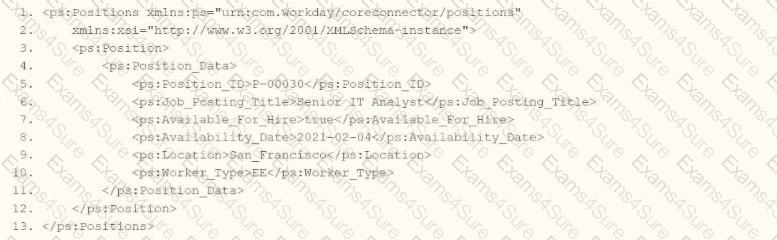
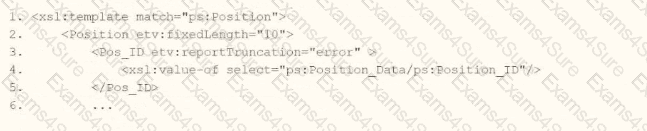
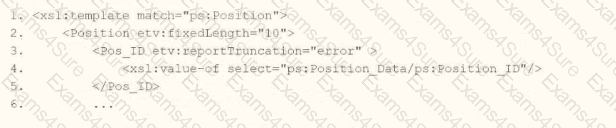
You need the integration file to format the ps:PositionJD field to 10 characters and report any truncated values as an error.
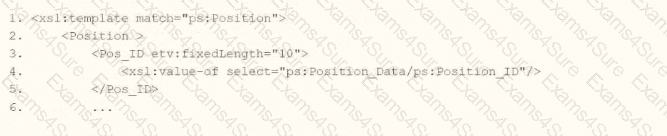
How will you start your template match on ps:Position to use Document Transformation (DT) to do the transformation using ETV with your truncation validation?
Options:
A.
B.
C.
D.