Exam style questions across every Workday-Pro-Integrations domain
Last Update 1 day ago
Total Questions : 109
Start with our free Workday-Pro-Integrations practice questions, carefully crafted to mirror the domains, phrasing, and difficulty of the real Workday Integrations exam. Each Workday-Pro-Integrations exam question comes with a detailed rationale that explains not just which answer is correct but why the others fall short. That's how concepts stick. Use the free set to benchmark yourself: identify your Workday weak domains, see where you're losing marks, and build a focused study plan in minutes.

This is the XML file generated from a Core Connector; Positions integration.
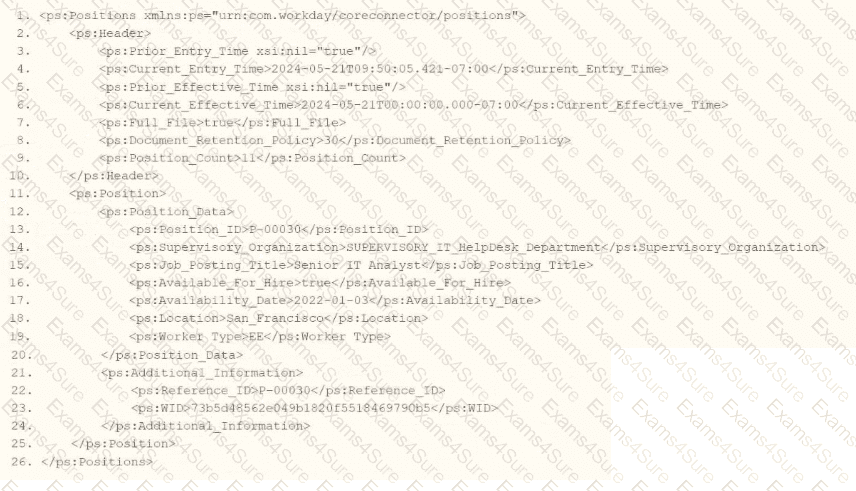
When performing an XSLT Transformation on the Core Connector: Positions XML output file, you want to show a hyperlink of positions that are not available for hiring as an entry in the Message tab.
What are all the needed ETV items to meet the above requirements?
Options:
A.

B.

C.

D.

Refer to the scenario. You are configuring a Core Connector: Worker integration with the Data Initialization Service (DIS) enabled, scheduled to run once daily. The integration must extract only active worker records with changes to compensation, home address, or business title since the last 24 hours. It uses Workday’s change detection to avoid full extracts.
During testing, the Core Connector: Worker DIS output unexpectedly includes terminated workers, even though the change detection date parameters are correctly defined for a Full-Diff extract. The requirements specify that only active workers should be included in the output.
What configuration step should you modify to ensure the integration excludes terminated workers?
What is the workflow to chain a Document Transformation system to a Connector integration for the purpose of transforming the output?
Refer to the following scenario to answer the question below.
You have been asked to build an integration using the Core Connector: Worker template and should leverage the Data Initialization Service (DIS). The integration will be used to export a full file (no change detection) for employees only and will include personal data.
What configuration is required to ensure that when outputting phone number only the home phone number is included in the output?
You are developing a Core Connector: Worker integration with DIS enabled. You configure the Population Eligibility to include all US workers and also define the Eligibility Criterion field to return only those workers assigned to the Sales organization.
When you run the integration, the output includes all US workers instead of just those in Sales.
What should you do to ensure only workers in the Sales organization appear in the output?
What is a key function and primary benefit of using a Document Transformation Connector within the integration capabilities of Workday?
Refer to the following XML data source to answer the question below.
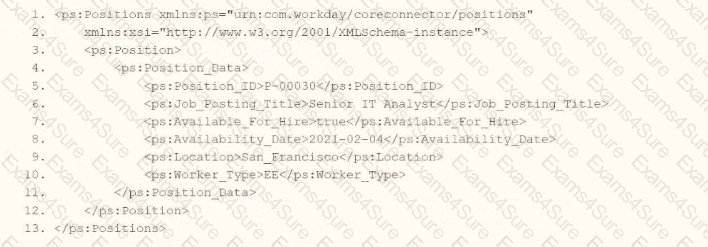
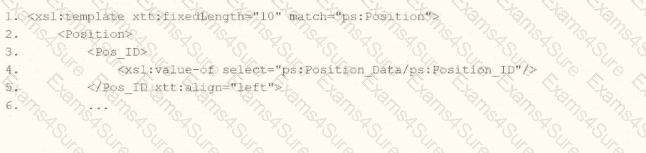
You need the integration file to format the ps:Position_ID field to 10 characters, truncate the value if it exceeds, and align everything to the left.
How will you start your template match on ps:Position to use Document Transformation (DT) to do the transformation using XTT?
Options:
A.

B.

C.

D.
Refer to the following scenario to answer the question below.
You need to configure a Core Connector: Candidate Outbound integration for your vendor. The connector requires the data initialization service (DIS).
The vendor requests additional formatting of the candidate Country field. For example, if a candidate ' s country is the United States of America, the output should show US
A.
What steps do you follow to meet this request?
Refer to the following scenario to answer the question below.
You have been asked to build an integration using the Core Connector: Worker template and should leverage the Data Initialization Service (DIS). The integration will be used to export a full file (no change detection) for employees only and will include personal data.
What configuration is required to ensure that only employees, and not contingent workers, are output by this integration?