Pre-Winter Sale Limited Time 65% Discount Offer - Ends in 0d 00h 00m 00s - Coupon code: 65pass65

Free Fortinet NSE 6 - LAN Edge 7.6 Architect Practice Questions

Question # 11

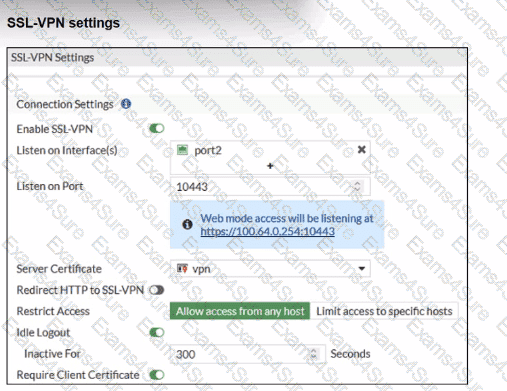
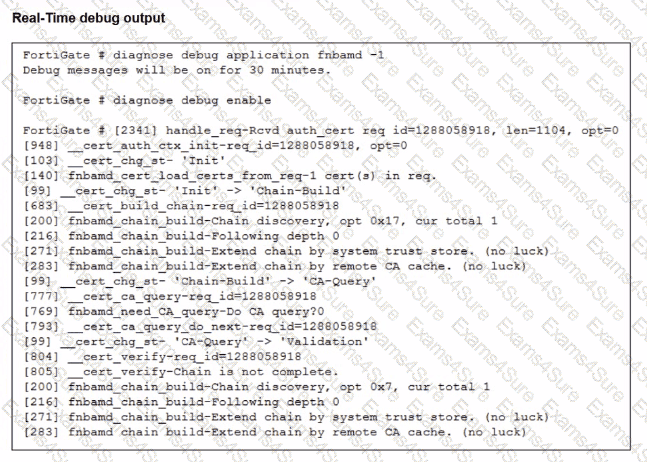
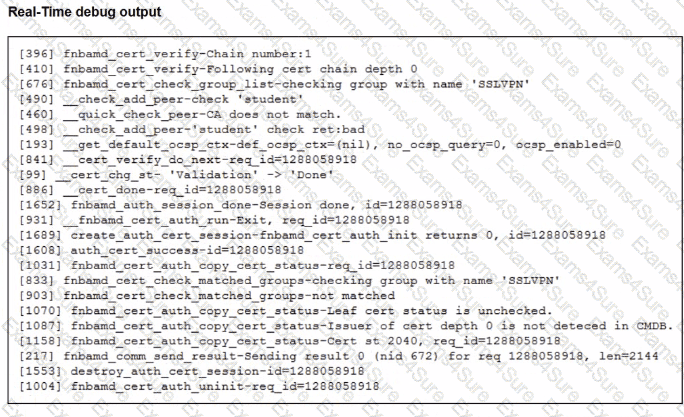
Refer to the exhibits.
Question # 11

Question # 11

Question # 11

Which include debug output and SSL VPN configuration details.

An SSL VPN has been configured on FortiGate. To enhance security, the administrator enabled Required Client Certificate in the SSL VPN settings. However, when a user attempts to connect, authentication fails.

Which configuration change is needed to fix the issue and allow the user to connect?

Options:

A.  

Enable Redirect HTTP to SSL-VPN on the SSL VPN configuration page.

B.  

Import the CA that signed the SSL VPN Server Certificate to FortiGate.

C.  

Set the user certificate as the Server Certificate on the SSL VPN configuration page.

D.  

Import the CA that signed the user certificate to FortiGate.

Discussion 0
Question # 12

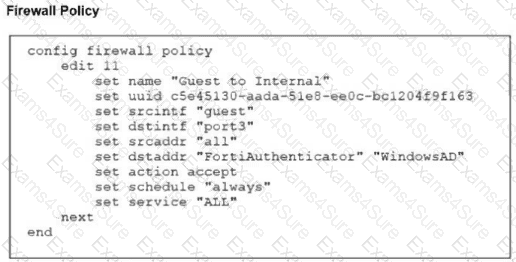
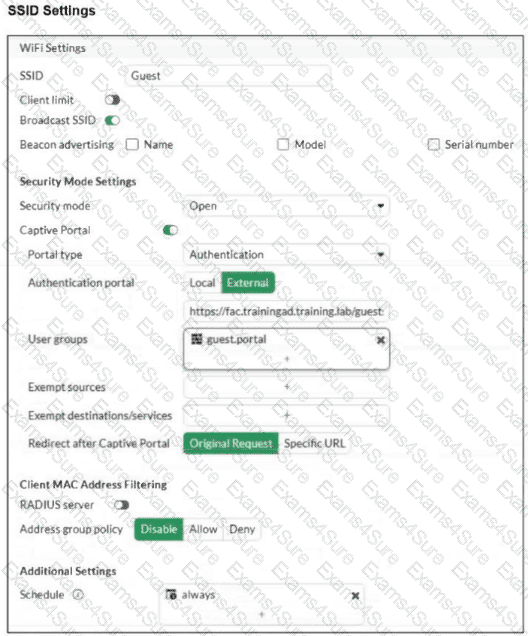
Refer to the exhibits.
Question # 12

Question # 12

Examine the firewall policy configuration and SSID settings. Users trying to connect to the new Guest wireless network should be redirected to an external captive portal, however, these wireless users are not able to see the captive portal login page. The external captive portal URL has been verified as correct, yet the issue persists. Which configuration change should fix the problem?

Options:

A.  

Add FortiAuthenticator and WindowsAD as exempt sources.

B.  

Security mode should be set to WPA2 Enterprise to authenticate through RADIUS.

C.  

A firewall policy with the ID 11 is missing to enable the captive-portal-exempt option.

D.  

Include the user group guest.portal in the firewall policy.

Discussion 0
Question # 13

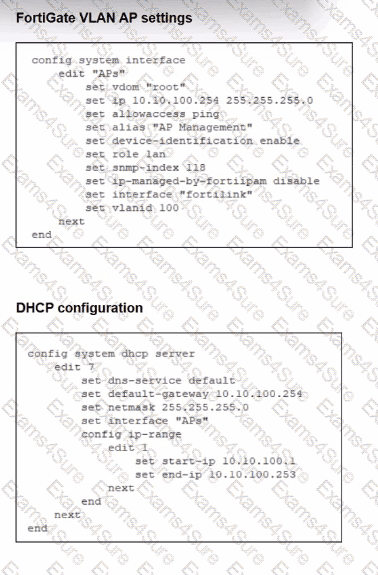
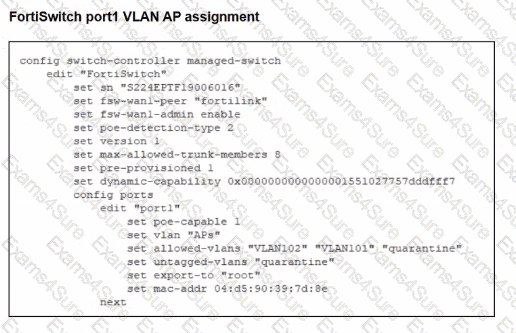
Refer to the exhibits.

Question # 13

Question # 13

A FortiSwitch is successfully managed by a FortiGate. FortiAP is connected to port1 of the managed FortiSwitch. On FortiGate, the VLAN AP is configured to detect and manage FortiAP, along with a DHCP server for the VLAN AP. Additionally, the VLAN AP is assigned to port1 of FortiSwitch. However. FortiGate is unable to detect or manage FortiAP.

Which FortiGate misconfiguration is preventing the detection of FortiAP?

Options:

A.  

Security Fabric is disabled in the administrative access options of the VLAN.

B.  

The FortiAP firmware is incompatible with the FortiGate firmware version.

C.  

The VLAN is not tagged correctly on the FortiSwitch uplink port.

D.  

The CAPWAP ports (UDP 5246 and 5247) are not open on FortiGate.

Discussion 0
Question # 14

What is the expected behavior when enabling auto TX power control on a FortiAP interface?

Options:

A.  

FortiGate monitors the signal strength of nearby AP interfaces and adjusts its own transmit power every 30 seconds to match the signal strength of the adjacent AP

B.  

FortiGate measures the signal strength of nearby FortiAP interfaces every 30 seconds and adjusts their transmit power to ensure they remain detectable at -70 dBm.

C.  

FortiGate periodically measures the signal strength of the weakest associated client and adjusts the AP radio power to align with the detected signal strength of that client.

D.  

The AP periodically evaluates the signal strength of its own transmission from the client perspective and adjusts its power to ensure the signal is detected at -70 dBm.

Discussion 0

FCSS_LED_AR-7.6 PDF

FCSS_LED_AR-7.6 PDF (Printable)
$54.25
$154.99

FCSS_LED_AR-7.6 Testing Engine

FCSS_LED_AR-7.6 PDF (Printable)
$59.5
$169.99

FCSS_LED_AR-7.6 PDF + Testing Engine

FCSS_LED_AR-7.6 PDF (Printable)
$74.55
$212.99

Free Exams Sample Questions