

Exam style questions across every I40-420 domain
Last Update 3 days ago
Total Questions : 249
Start with our free I40-420 practice questions, carefully crafted to mirror the domains, phrasing, and difficulty of the real IFPUG Certification exam. Each I40-420 exam question comes with a detailed rationale that explains not just which answer is correct but why the others fall short. That's how concepts stick. Use the free set to benchmark yourself: identify your IFPUG weak domains, see where you're losing marks, and build a focused study plan in minutes.

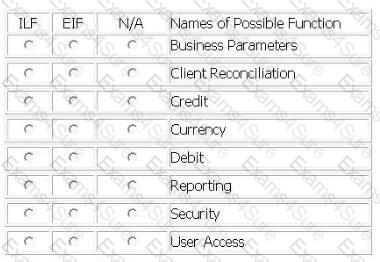
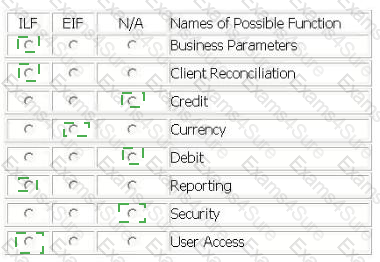
The Account Reconciliation Application (ARA) is used by banking operations to match credit (in) and debit (out) transactions within client accounts. Both credit and debit transactions are received from several other applications and stored as the Client Reconciliation logical file. ARA is capable of automatically matching transactions based on the Business Parameters logical file which is maintained by users in the AR
A.
Access permissions in the User Access logical file are maintained by users in the ARA, and contain online user account permissions and approval levels.
The users can maintain their own report forms in the Reporting logical file. All reports use the Currency logical file, which is maintained by an external application, to convert the local payment currency to Euros.
From the Names of Possible Functions listed identify the data functions for the AR
A.
Select N/A if a Name of Possible Function does not apply.Identify the functions used:
LIBRARY INFORMATION SYSTEM (LIS) - REGISTER A TEXT
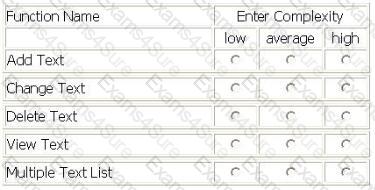
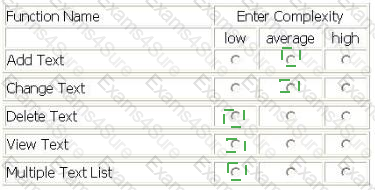
- The LIS user Adds data related to a new text in the Library, by entering ISBN code, title, author, publisher, series, typology, publishing date and acquisition date on the screen and pressing the OK button. All data entered is maintained in the Text logical file. The ISBN code and the publisher are validated against the Publishers Guide logical file.
- The LIS user Views data related to an existing text in the Library by entering the ISBN code, title, author or publisher on a selection screen.
- If only one text matches the selection criteria, the View Text screen is displayed. ISBN code, title, author, publisher, series, typology, publishing date and acquisition date are displayed.
- If a record in the Text logical file does not match the criteria entered, an error message is displayed to the user.
- If more than one record matches the criteria, the Multiple Text List List is displayed. For each of the texts that matches the criteria the following attributes are shown: ISBN code, title, author, publishing date and the percentage match to the criteria. The LIS user can display the View Text screen by selecting a single text and pressing the OK button.
- The LIS user Changes Text text data by changing any values on the View Text screen with the exception of the ISBN code and pressing the Change button. If the publisher is changed it is validated against the Publishers Guide logical file.
- The user Deletes text data from the Text logical file by entering on the screen the ISBN code of the text and pressing the Delete button.
Determine the complexity of the following functions:
Select the complexity for each function:
A Corporate Finance application is being developed.
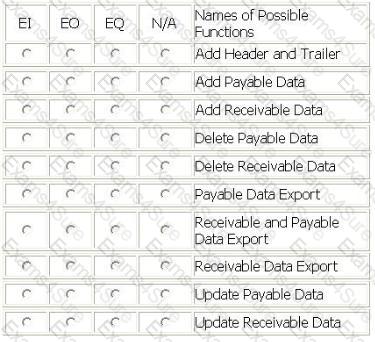
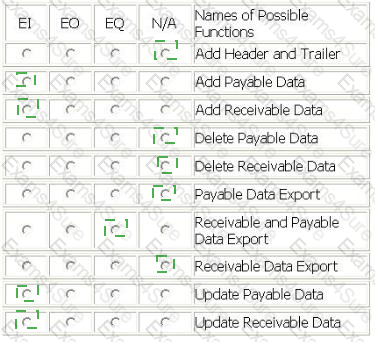
The application adds or updates the Receivable logical file and the Payable logical file. The user requires that this information is sent to the Accounts application to keep accounting records consistent. The combined receivable and payable data is sent to the Accounts application daily at 8:00 PM.
When implementing a solution to send the receivable and payable information, it was decided to include a header and trailer record with the accounts information. These records are used by the Corporate Finance user to ensure that everything was technically correct when transmitting the file.
From the Names of Possible Functions listed identify the transactional functions for the Corporate Finance application. Select N/A if a Name of Possible Function does not apply.
Identify the functions used:
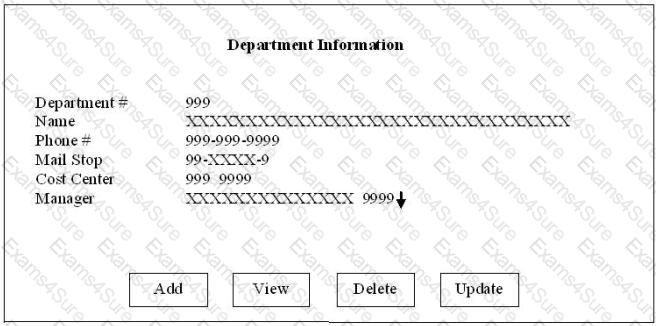
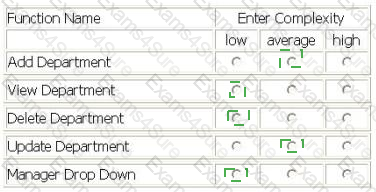
The Human Resources (HR) application includes functionality to maintain the Department logical file.
- The user enters a department number and presses the View button to display an existing department. An error message is displayed if the department does not exist.
- When the user adds or updates a department, the cost center is validated against the Cost Center logical file. The Cost Center logical file is maintained in the Payroll application.
- The user Adds a new department by entering department #, Name, phone #, mail stop, cost center and manager. The user completes the add by pressing the Add button. An error message displayed if the department # already exists.
- The user Updates information about the displayed department. Name, phone #, mail stop, cost center and manager may be changed. The user completes the update by pressing the Update button.
- The user Deletes the displayed department by pressing the Delete button.
- A manager must be selected using the Manager Drop Down list, which displays manager name and department number. The Employee logical file is maintained in the HR application and is the source for the Manager Drop Down list.
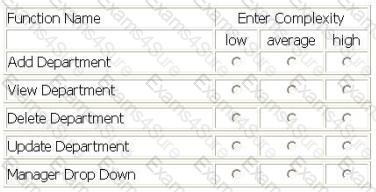
Determine the complexity for department transactions.
Select the complexity for each function.
EXAM SCHEDULING APPLICATION (ESA) - EXAM SCHEDULING SCREEN
- The controller uses a screen to schedule exams for various courses and subjects. The exam serial number from the University Master logical file, maintained by the University Master Information application, is entered in the screen. On pressing the RETRIEVE key, the exam status, exam name, controller number, finals week start date and finals week end date are displayed.
- Detailed exam schedules stored within the Schedule logical file are also displayed on the screen as part of the RETRIEV
E.
- By pressing the ADD key or MODIFY key, the user may add or update the course id, subject id, exam date, start time, end time, proctor and message using exam serial number as the key field. The data is saved in the Schedule logical file with the 'pending approval' in the exam status.
- Course id, subject id and exam date pick lists provide data from static tables.
- The exam date should be within the finals week start and end dates
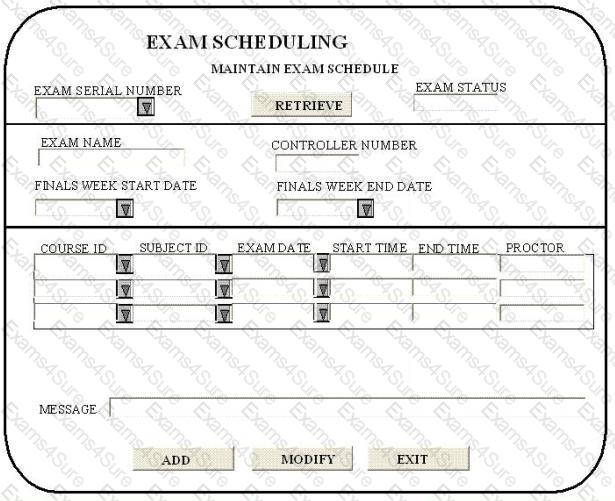
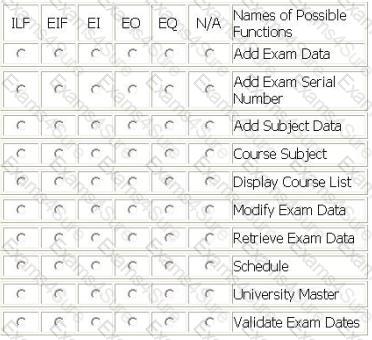
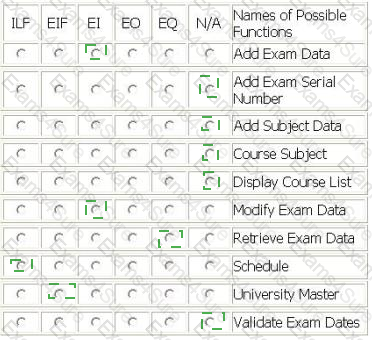
From the Names of Possible Functions listed identify the base functional components for the ESA application. Select N/A if a Name of Possible Function Type does not apply.
Identify the functions used:
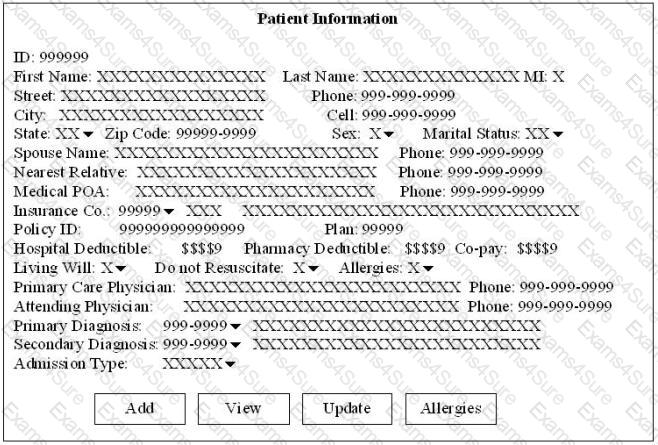
The Patient Billing application includes functionality to maintain the Patient logical file.
- The user enters a patient id and presses the View button to display an existing patient record, including diagnosis description and insurance company name. An error message is displayed if the patient record does not exist.
- The user Adds a new patient by entering a patient ID and the remaining values. The user completes the add by pressing the Add button. An error message is displayed if the patient id already exists.
- The user Updates information about the patient. All attributes can be modified except for patient id. The user completes the update by pressing the Update button
- A diagnosis code must be selected using a drop down list for the primary diagnosis and the secondary diagnosis. The drop down list function is identical for primary and secondary diagnosis. The Diagnosis logical file is maintained in the Patient Billing application and is the source for the Diagnosis Code Drop Down list. The Diagnosis Code Drop Down list displays the diagnosis code, description and authorized days of hospitalization.
- An insurance company code must be selected using the Insurance Company Drop Down list. The Insurance logical file is used as the source. The Insurance Company Drop Down list displays the insurance company number, group type and name.
- All other drop down lists use static data as the source.
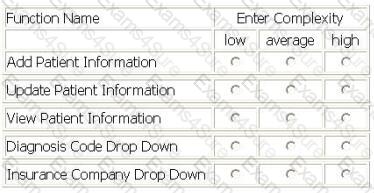
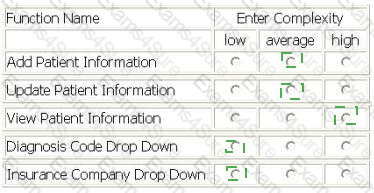
Determine the complexity for the following functions:
Select the complexity for each function:
The Order Entry Modification screen populates all order details into the Order logical file. The modification process also populates the Advance Shipment Notification logical file and references the Available Inventory logical file. The user required before and after images to be captured for 3 attributes in the Oder logical file. The technical team has decided to store this data in the Order Audit file for ease of access. How many transactional functions and logical files are counted in the modification process?
A screen that adds an order record to the Order file is being enhanced to capture 10 additional attributes. These new attributes do not fit onto the existing screen, so a new screen is being created to collect the 10 new attributes before creating the Order record. How is the screen counted for the enhancement project?
An EO maintains 1 ILF and references 3 ILFs. What is the minimum number of DETs necessary for it to be valued at 7 UFP?
A logical data store is maintained by the application being counted. It has tax code as the key attribute and tax rate as the only other attribute. How would this data store be counted?



