Exam style questions across every I40-420 domain
Last Update 3 days ago
Total Questions : 249
Start with our free I40-420 practice questions, carefully crafted to mirror the domains, phrasing, and difficulty of the real IFPUG Certification exam. Each I40-420 exam question comes with a detailed rationale that explains not just which answer is correct but why the others fall short. That's how concepts stick. Use the free set to benchmark yourself: identify your IFPUG weak domains, see where you're losing marks, and build a focused study plan in minutes.

Which transactional function(s) has (have) the primary intent of presenting information to the user and must reference a data function to retrieve data or control information?
Complete the statement. Developers translate the__________ into software in order to provide a solution.
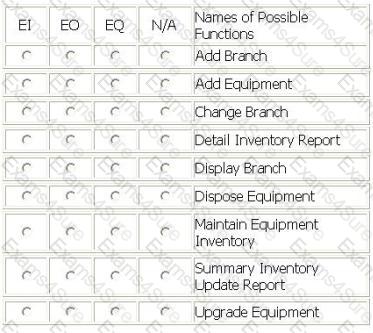
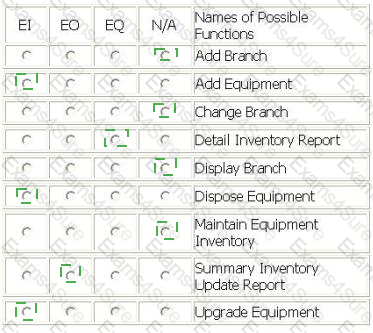
An Assets Tracking application has a batch update process. Twice a month each of the branch offices sends a transaction file to the headquarters.
- Records are flagged with an "A" for equipment that is Added to the inventory; "C" for equipment that has been Upgraded or refurbished; "D" for equipment that has been Disposed of and is to be removed from inventory.
- A summary inventory update report will be created that totals number of inventory records added, changed and deleted broken out by equipment type. The report will be sorted by branch and will start on a new page for each change of branch.
- A detail inventory report will be available to the branches with the detail of inventory records updated.
- From the Names of Possible Functions listed identify the transactional functions for the Assets Tracking application. Select N/A if a Name of Possible Functions does not apply.
Identify the functions used.
ALERT SYSTEM - ALERT NOTIFICATION
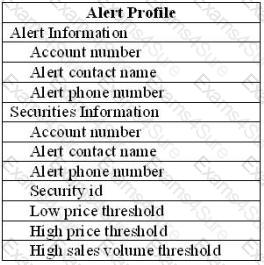
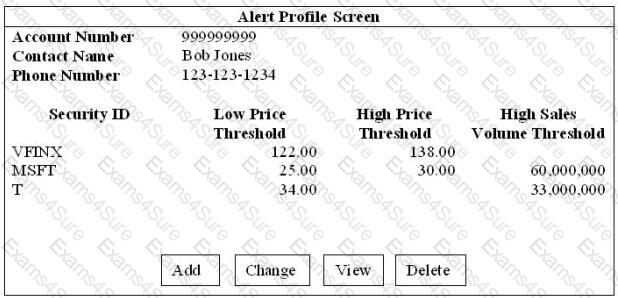
- Brokers use the Alert Profile screen to maintain the Alert Profile logical file. They can Add, Change, Delete and View alert information.
- Brokers also maintain a list of many securities to monitor. The securities information is considered to be part of the Alert Profile.
- The Alert Profile record is not considered complete until at least one security has been entered. The account number, alert contact name, alert phone number, and security id are required fields. The user is required to enter at least one of the remaining fields: low price threshold, high price threshold, and high volume threshold, they may enter values in all three.
- When an Alert Profile record is Added a validation is performed on the account number against the Account Master logical file and a validation on the securities against the Securities logical file.
- When Alert Profile records are Changed a validation is on the account number against the Account Master. All fields can be modified.
- No validations are performed for the Alert Profile View.
- When an Alert Profile record is Deleted the user must enter the account number, alert contact name, alert phone number. The account number is validated against the Account Master.
- Error messages are displayed whenever validations fail
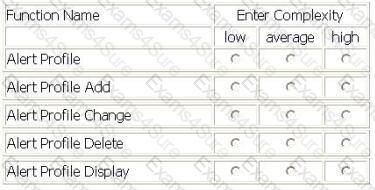
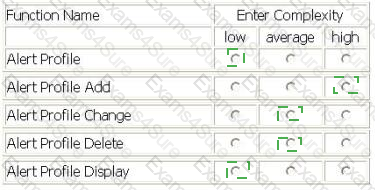
Select the complexity of each function:
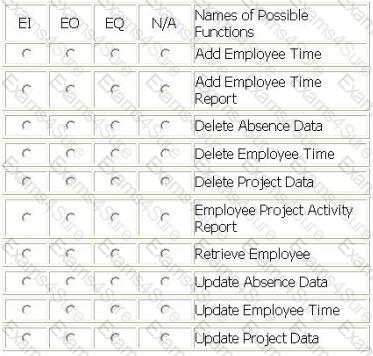
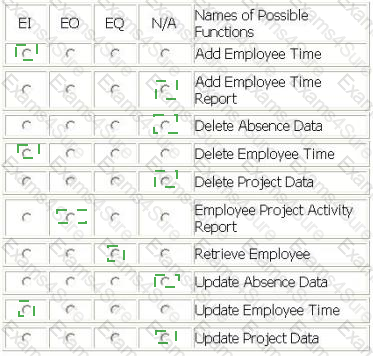
PAYROLL APPLICATION - MAINTAIN EMPLOYEE TIME SCREEN
- Employees can Add or Update their weekly hours information by entering the project and absence data on the Maintain Employee Time screen. Data is saved to the Employee Payroll IL
F.
- To begin the Add or Update from the Maintain Employee Time screen, the employee enters his/her employee badge number presses the Retrieve button. Retrieve will fill in the employee name and supervisor badge number from the Employee Master ILF, and will display the current pay period start date and end date from the Payroll Master IL
F.
- Employees can Delete existing weekly hours information by entering his/her employee badge number and pressing the delete button on the Maintain Employee Time screen. When the employee presses the delete button the current pay period hours will be removed from the Employee Payroll IL
F.
PAYROLL APPLICATION - EMPLOYEE PROJECT ACTIVITY REPORT
- The Employee Project Activity report is produced for each employee and routed electronically to that employee's email address. Each employee's project task hours for the current pay period are read from the Employee Payroll IL
F.
The report calculates and displays both daily and weekly total hours for the current pay period.
- From the Names of Possible Functions listed identify the transactional functions for the Payroll application. Select N/A if a Name of Possible Functions does not apply.
Identify the functions used.
ITEM CHECK-OUT SCREEN
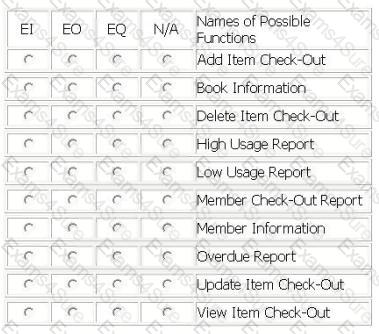
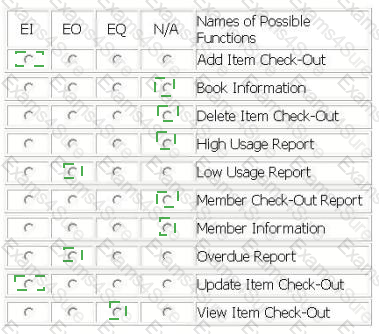
- Library employees use the Item Check-Out screen when a member is ready check out the book(s) and/or magazine(s) he wishes to borrow. The library employee enters the member id number, and when the employee exits the member id attribute, if the member id is valid, the member name is retrieved from the Member Information logical file and displayed in the member name attribute. The library employee enters the item type (b for book, m for magazine) and the item code; the item title is retrieved from the Book Information logical file and displayed in the item title attribute. The library employee then enters the lending date and the due date, and presses the Add button. The information is stored in the Check-Out logical file.
- Library employees use the Item Check-Out screen to update the due date of a book or magazine if a member requests additional lending time. The employee enters the member id number, and when the employee exits the member id attribute, if the member id is valid, the member name is retrieved from the Member Information logical file and displayed in the member name attribute, the library employee enters the item type (b for book, m for magazine) and the item code; the item title is retrieved from the Book Information logical file and displayed in the item title attribute and the lending date and due date are retrieved from the Check-Out logical file. The library employee then updates the due date, and presses the Update button. The new due date is stored in the Check-Out logical file.
- The head librarian receives two reports from the Library Check-Out application. The first report is the Overdue Report which is a list of overdue items categorized into < 30 days overdue, 30 - 90 days overdue and > 90 days overdue.
- The second report is the Low Usage Report that calculates which fiction books have not been checked out in the last 24 months and lists the title of those books. This report is run on demand. A High Usage Report with the number of times an item has been checked out has been put on hold and will not be released.
- A proposed Member Check-Out Report with a list of books checked-out and recommended titles will not be developed until privacy issues have been resolved.
- From the Names of Possible Functions listed identify the transactional functions for the current Library Check-Out application. Select N/A if a Name of Possible Function does not apply.
Identify the functions used:
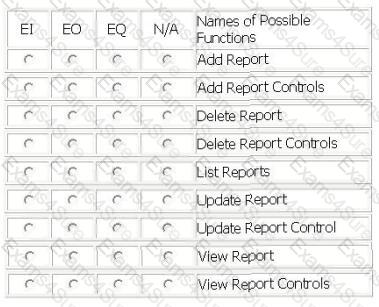
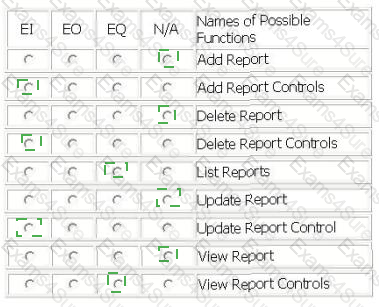
The Procurement application user requires the ability to control how and when reports are printed. The following list shows the specific user requirements for generating reports:
- Display a list of reports that are available to be printed.
- The user selects a report to be printed. If report control information exists for the requested report, the report control is displayed from the Report Control logical file.
- If report control information has not been specified for the requested report, the user may add the following report controls:
- uk.co.certification.simulator.questionpool.PList@21015f00
- If report control information exists for the requested report, the user may update or delete the report controls.
From the Names of Possible Functions listed identify the transactional functions for the Procurement application. Select N/A if a Name of Possible Function does not apply.
Identify the functions used:
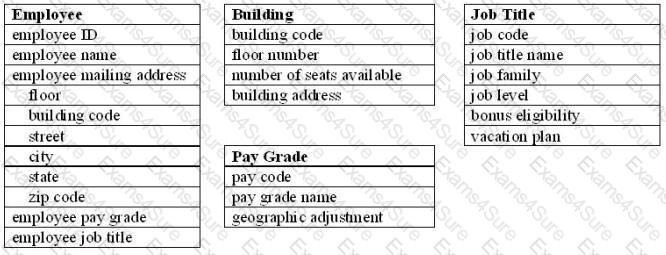
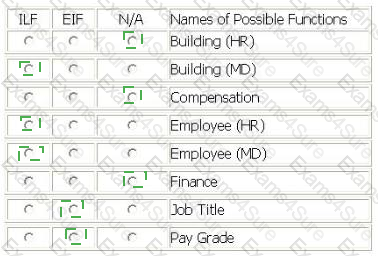
An enhancement project involves both the Human Resource (HR) application and the Mail Distribution (MD) application.
The HR application maintains all data elements in the Employee logical file. The users of the HR application require validations for employee pay grade and employee job title in the Employee logical file. The employee pay grade will be validated against the Pay Grade logical file which is maintained by the Finance application. The employee job title will be validated against the Job Title logical file which is maintained by the Compensation application.
The MD application maintains two data elements in the Employee logical file. The users of the MD application require additional validations for building and floor within the employee mailing address. The building and floor will be validated against the Building logical file which is a new file being developed by this project.
The users will use the MD application to maintain the Building logical file. The users of the MD application also maintain building and floor in the Employee logical file.
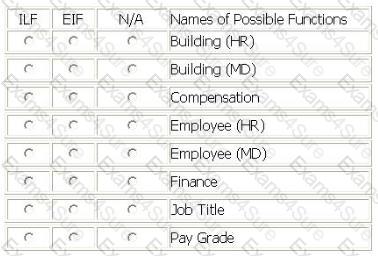
From the Names of Possible Functions listed identify the data functions for the HR application and the MD application. Select N/A if a Name of Possible Function does not apply.
Identify the data functions used:
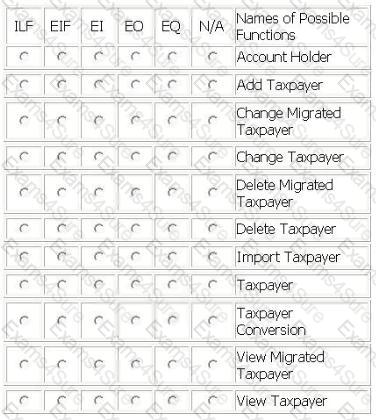
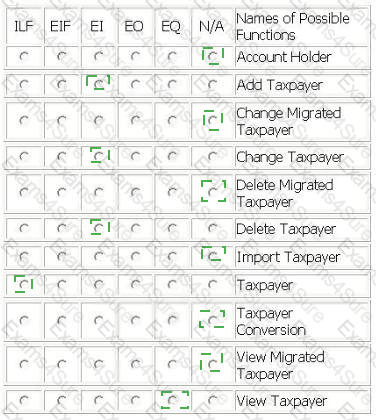
TAX APPLICATION
For the TAX application the user required the migration of existing taxpayer information (name, tax identification number, location name) to the TAX application. A conversion file with taxpayer data was created and imported into the Taxpayer logical file in the TAX application. The source of the data was the Account Holder logical file.
The user required the ability to Add, Change and Delete the taxpayer information in the Taxpayer logical file.
The user required the ability to View the taxpayer information prior to changing or deleting information.
From the Names of Possible Functions listed identify the base functional components for the TAX application baseline. Select N/A if a Name of Possible Functions does not apply.
Identify the functions used: