You have a Microsoft 365 subscription that uses Microsoft Intune Suite.
You use Microsoft Intune to manage devices.
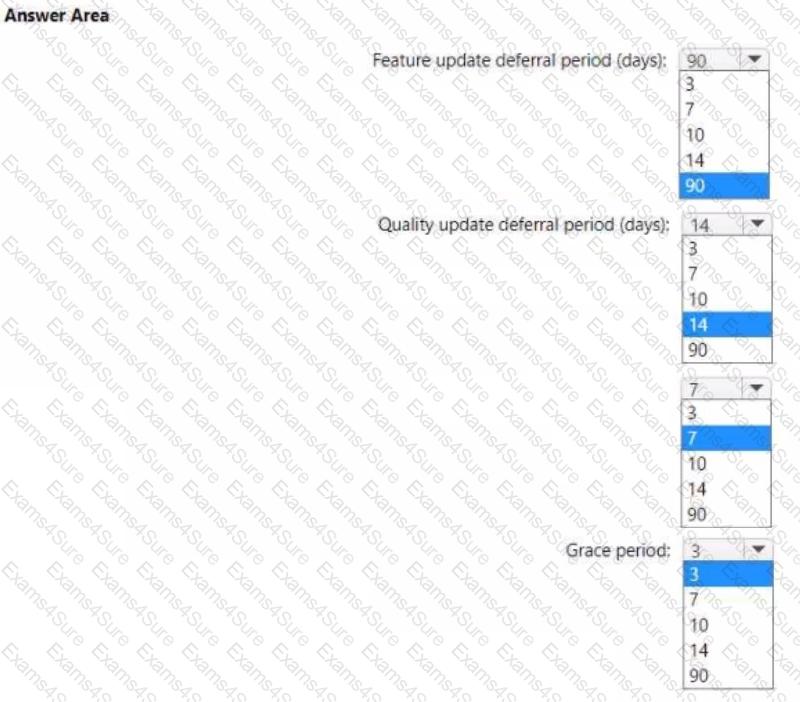
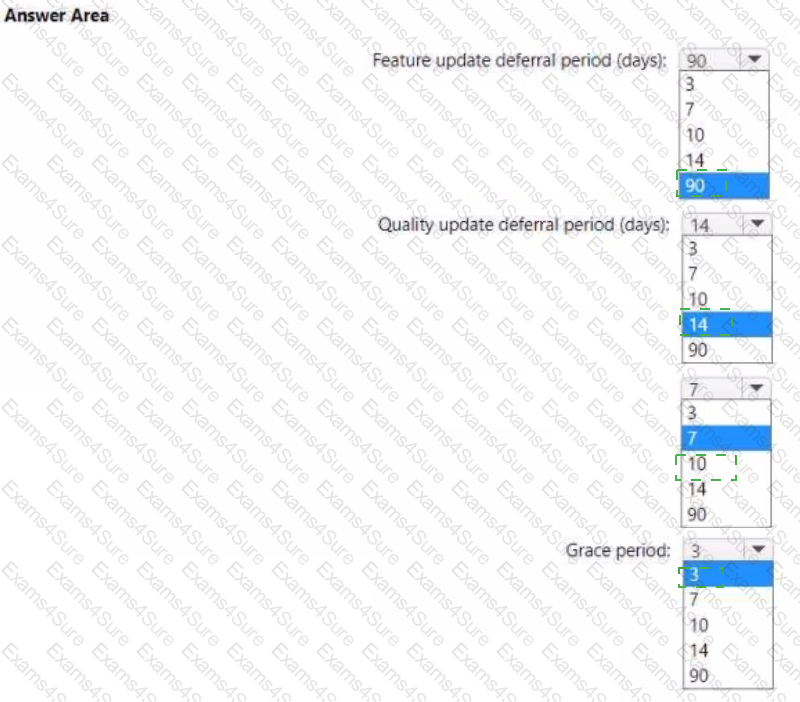
You need to configure an update ring that meets the following requirements:
• Fixes and improvements to existing Windows functionality can be deferred for 14 days but will install automatically seven days after that date.
• The installation of new Windows features can be deferred for 90 days but will install automatically 10 days after that date.
• Devices must restart automatically three days after an update is installed.
How should you configure the update ring? To answer, select the appropriate options in the answer area. NOTE: Each correct selection is worth one point.
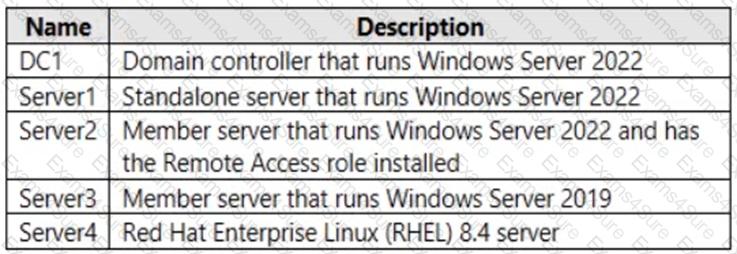
You have the on-premises servers shown in the following table.
You have a Microsoft 365 E5 subscription that contains Android and iOS devices. All the devices are managed by using Microsoft Intune.
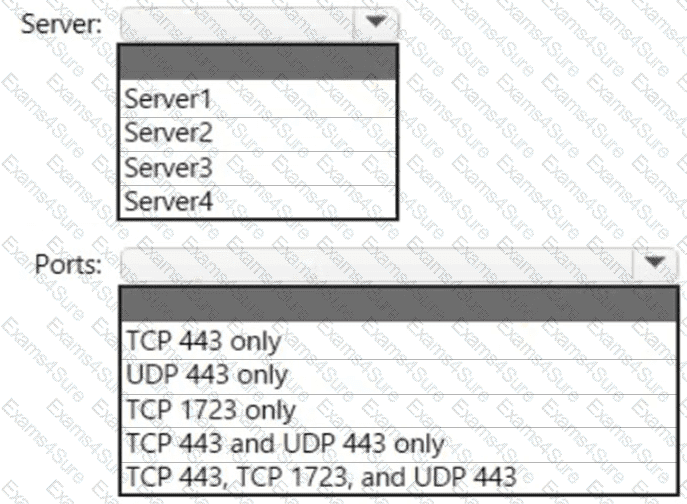
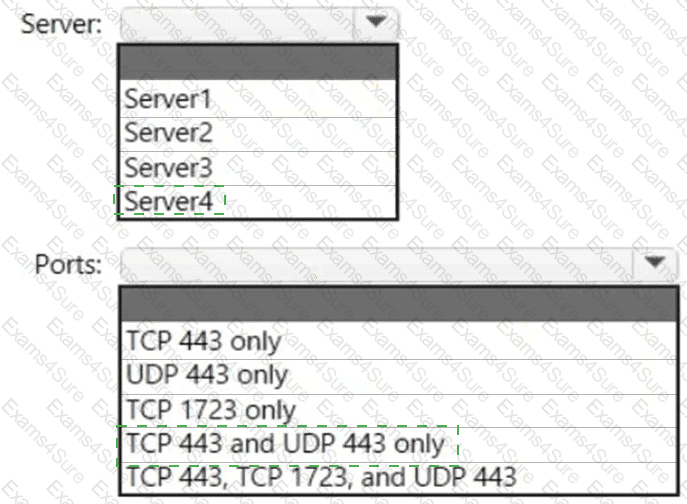
You need to implement Microsoft Tunnel for Intune. The solution must minimize the number of open firewall ports.
To which server can you deploy a Tunnel Gateway server, and which inbound ports should be allowed on the server to support Microsoft Tunnel connections? To answer, select the appropriate options in the answer area.
NOTE: Each correct selection is worth one point.
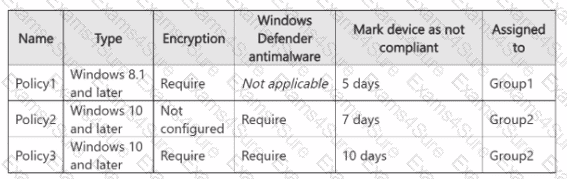
In Microsoft Intune, you have the device compliance policies shown in the following table.
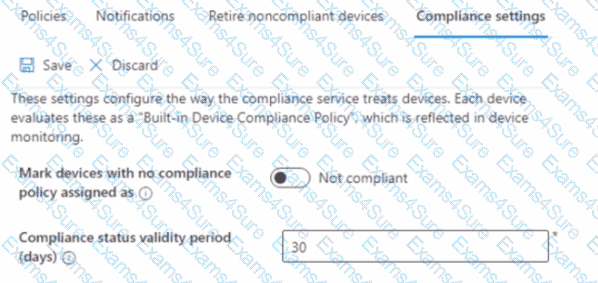
The Intune compliance policy settings are configured as shown in the following exhibit.
On June 1, you enroll Windows 11 devices in Intune as shown in the following table.

For each of the following statements, select Yes if the statement is true. Otherwise, select No.
NOTE: Each correct selection is worth one point


You have a Microsoft 365 tenant that uses Microsoft Intune to manage the devices shown in the following table.
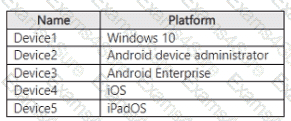
You need to deploy a compliance solution that meets the following requirements:
• Marks the devices as Not Compliant if they do not meet compliance policies
• Remotely locks noncompliant devices
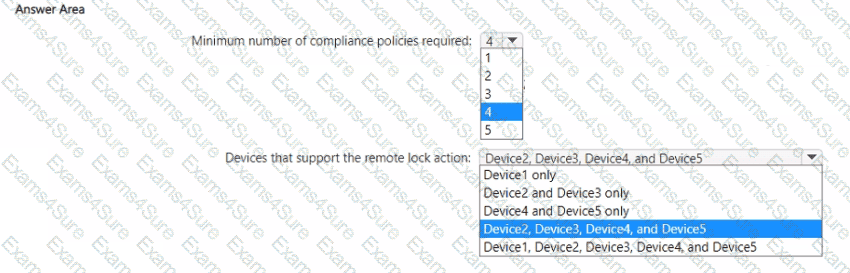
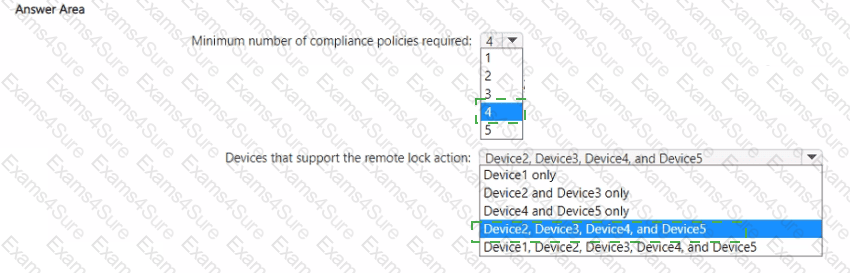
What is the minimum number of compliance policies required, and which devices support the remote lock action? To answer, select the appropriate options in the answer area.
NOTE: Each correct selection is worth one point.
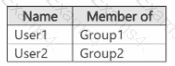
You have a Microsoft Entra tenant that contains the users shown in the following table.
You have devices enrolled in Microsoft Intune as shown in the following table.
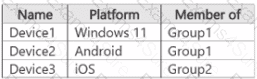
From Intune, you create and send a custom notification named Notification! to Group1. For each of the following statements, select Yes if the statement is true. Otherwise, select No.
NOTE: Each correct selection is worth one point.


You have a Microsoft Azure subscription that contains an Azure Log Analytics workspace.
You deploy a new computer named Computer1 that runs Windows 10. Computer1 is in a workgroup.
You need to ensure that you can use Log Analytics to query events from Computer1.
What should you do on Computer1?
You have a Microsoft 365 subscription that contains the devices shown in the following table.
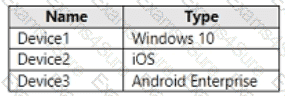
You need to ensure that only devices running trusted firmware or operating system build can access network resources.
Which compliance policy setting should you configure for each device? To answer, drag the appropriate settings to the correct devices. Each setting may be used once, more than once, or not at all. You may need to drag the split bar between panes or scroll to view content.
NOTE: Each correct selection is worth one point.


You have a Microsoft 365 ES subscription.
You use Microsoft Intune to manage all devices.
You need to prepare a Win32 app named Appl.exe for deployment.
What should you do first?
Your network contains an Active Directory Domain Services (AD DS) domain. The domain contains 100 client computers that run Windows 10.
Currently, your company does NOT have a deployment infrastructure.
The company purchases Windows 11 licenses through a volume licensing agreement.
You need to recommend how to upgrade the computers to Windows 11. The solution must minimize licensing costs.
What should you include in the recommendation?