Pre-Summer Sale Limited Time 65% Discount Offer - Ends in 0d 00h 00m 00s - Coupon code: 65pass65

MD-102 Endpoint Administrator is now Stable and With Pass Result | Test Your Knowledge for Free

Exams4sure Dumps

MD-102 Practice Questions

Endpoint Administrator

Last Update 6 hours ago
Total Questions : 350

Dive into our fully updated and stable MD-102 practice test platform, featuring all the latest Microsoft 365 Certified: Endpoint Administrator Associate exam questions added this week. Our preparation tool is more than just a Microsoft study aid; it's a strategic advantage.

Our free Microsoft 365 Certified: Endpoint Administrator Associate practice questions crafted to reflect the domains and difficulty of the actual exam. The detailed rationales explain the 'why' behind each answer, reinforcing key concepts about MD-102. Use this test to pinpoint which areas you need to focus your study on.

MD-102 PDF

MD-102 PDF (Printable)
$48.3
$137.99

MD-102 Testing Engine

MD-102 PDF (Printable)
$52.5
$149.99

MD-102 PDF + Testing Engine

MD-102 PDF (Printable)
$65.45
$186.99
Question # 41

Your company has 200 computers that run Windows 10. The computers are managed by using Microsoft Intune. Currently, Windows updates are downloaded without using Delivery Optimization. You need to configure the computers to use Delivery Optimization. What should you create in Intune?

Options:

A.  

a device compliance policy

B.  

a Windows 10 update ring

C.  

a device configuration profile

D.  

an app protection policy

Discussion 0
Question # 42

You have a Microsoft 365 subscription. All devices run Windows 10.

You need to prevent users from enrolling the devices in the Windows Insider Program.

What two configurations should you perform from the Microsoft Intune admin center? Each correct answer is a complete solution.

NOTE: Each correct selection is worth one point.

Options:

A.  

a device restrictions device configuration profile

B.  

an app configuration policy

C.  

a Windows 10 and later security baseline

D.  

a custom device configuration profile

E.  

a Windows 10 and later update ring

Discussion 0
Question # 43

You have a Microsoft 365 E5 subscription that contains 150 hybrid Azure AD joined Windows devices. All the devices are enrolled in Microsoft Intune. You need to configure Delivery Optimization on the devices to meet the following requirements:

• Allow downloads from the internet and from other computers on the local network.

• Limit the percentage of used bandwidth to 50.

What should you use?

Options:

A.  

a configuration profile

B.  

a Windows Update for Business Group Policy setting

C.  

a Microsoft Peer-to-Peer Networking Services Group Policy setting

D.  

an Update ring for Windows 10 and later profile

Discussion 0
Question # 44

You have a Microsoft 365 E5 subscription and use Microsoft Intune.

You need to use a Sync bulk device action on all corporate-owned Windows devices.

What is the maximum number of devices you can include the action?

Options:

A.  

25

B.  

50

C.  

100

D.  

500

E.  

1000

Discussion 0
Question # 45

You have a Microsoft 365 E5 subscription that contains 1,000 Windows 11 devices. All the devices are enrolled in Microsoft Intune.

You plan to integrate Intune with Microsoft Defender for Endpoint.

You need to establish a service-to-service connection between Intune and Defender for Endpoint.

Which settings should you configure in the Microsoft Endpoint Manager admin center?

Options:

A.  

Connectors and tokens

B.  

Premium add-ons

C.  

Microsoft Tunnel Gateway

D.  

Tenant enrollment

Discussion 0
Question # 46

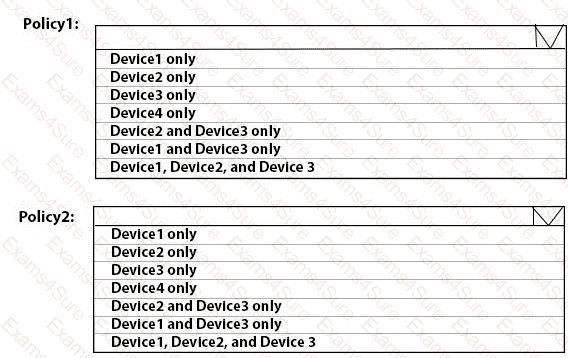
You have 100 computers that run Windows 10. You have no servers. All the computers are joined to Microsoft Azure Active Directory (Azure AD).

The computers have different update settings, and some computers are configured for manual updates.

You need to configure Windows Update. The solution must meet the following requirements:

The configuration must be managed from a central location.

Internet traffic must be minimized.

Costs must be minimized.

How should you configure Windows Update? To answer, select the appropriate options in the answer area.

NOTE: Each correct selection is worth one point.
Question # 46

Options:

Discussion 0
Question # 47

You have a Microsoft 365 subscription that contains a user named User1.

You use Microsoft in tune to manage devices that run Windows 11.

You need to remove User1 from the local Administrators group on all enrolled devices. The solution must minimize administrative effort.

What should you configure?

Options:

A.  

a device compliance policy

B.  

an app configuration policy

C.  

an account protection policy

Discussion 0
Question # 48

You have a Microsoft 365 E5 subscription that contains the devices shown in the following table.

Question # 48

All the devices are enrolled in Microsoft Intune and have Microsoft 365 Apps for enterprise installed On which devices can you use the Cloud Policy service for Microsoft 365 to manage Microsoft 365 Apps for enterprise?

Options:

A.  

Device1 only

B.  

Device1 and Device2 only

C.  

Device1, Device2, and Device3 only

D.  

Device1, Device2, and Device4 only

E.  

Device1, Device2. Device3. and Device4

Discussion 0
Question # 49

You have a Microsoft Entra tenant named contoso.com.

You manage devices by using Microsoft Intune. Automatic Intune enrollment is disabled.

Users report that they must enter the mobile device management (MDM) server address during device enrollment.

To reduce user interaction during device enrollment, you plan to create the following CNAME DNS hostname records:

    EnterpriseEnrollment.contoso.com

    EnterpriseRegistration.contoso.com

You need to configure a fully qualified domain name (FQDN) for each CNAME record to redirect enrollment requests to the Intune

servers.

How should you configure each FQDN? To answer, select the appropriate options in the answer area.

NOTE: Each correct selection is worth one point.
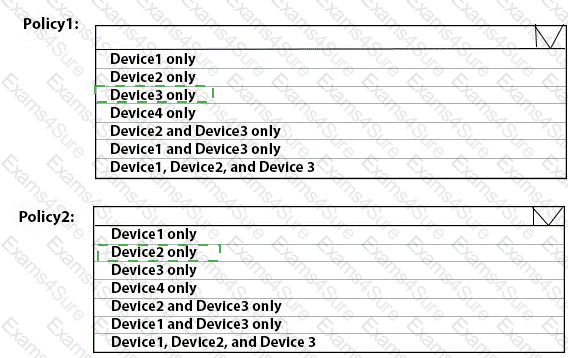
Question # 49

Options:

Discussion 0
Question # 50

You have a Microsoft 365 ES subscription.

You use Microsoft Intune to manage all devices.

You need to prepare a Win32 app named Appl.exe for deployment.

What should you do first?

Options:

A.  

From the Microsoft Intune admin center, create an app configuration policy.

B.  

Change App1.exe to the INIUNEW1N format.

C.  

From the Microsoft 365 Apps admin center, create a deployment configuration

D.  

Upload App1 exe to Azure Blob Storage.

Discussion 0
Get MD-102 dumps and pass your exam in 24 hours!

Free Exams Sample Questions