

Exam style questions across every PK0-005 domain
Last Update 2 days ago
Total Questions : 460
Start with our free PK0-005 practice questions, carefully crafted to mirror the domains, phrasing, and difficulty of the real Project+ exam. Each PK0-005 exam question comes with a detailed rationale that explains not just which answer is correct but why the others fall short. That's how concepts stick. Use the free set to benchmark yourself: identify your CompTIA weak domains, see where you're losing marks, and build a focused study plan in minutes.

A project manager reports that the implementation of a new system is on track to be completed under budget and ahead of the schedule. A stakeholder then asks the manager to add mobile device functionality. Which of the following should the project manager do in response to the request?
A company is starting a new implementation project The stakeholders are reviewing RFP responses to help make a decision about which project management consulting firm to hire. Given the following information:
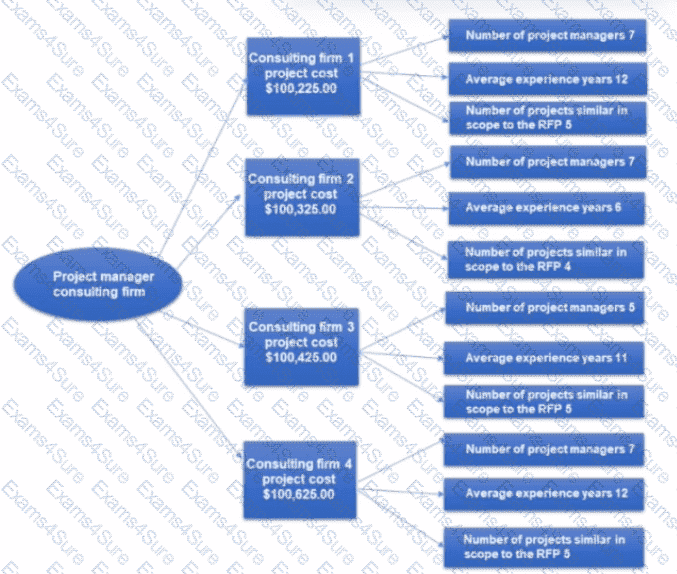
Which of the following is the best consulting firm for the company to hire?
A project team member wrote a user guide over the past ten days. Given the following scatter diagram.
Which erf the following can be formally conducted?
A stakeholder raises a concern with a project manager because of the number of emails that have been received before a coding release. Which of the following actions should the project manager take next?
A new project has been assigned to a project manager. In order to move forward with the project charter, which of the following should the project manager work with to define the success criteria for the initiative?
A project team is determining how an application will be moved to production, who the users will be, and what training is needed. Which of the following best describes what is being developed?
During a functional validation exercise, two end users request changes to the product that cannot be implemented without altering the already constrained project budget. The project manager convinces the end users to simplify the change request so it can be accomplished. Which of the following conflict resolution techniques did the project manager use?
A project manager is currently meeting with a vendor who completed the project work. All invoices associated with the project have been paid. Which of the following best describes the project manager ' s objective for the vendor meeting?



