Pre-Summer Sale Limited Time 65% Discount Offer - Ends in 0d 00h 00m 00s - Coupon code: 65pass65

200-301 Implementing and Administering Cisco Solutions (200-301 CCNA) v1.1 is now Stable and With Pass Result | Test Your Knowledge for Free

Exams4sure Dumps

200-301 Practice Questions

Implementing and Administering Cisco Solutions (200-301 CCNA) v1.1

Last Update 4 days ago
Total Questions : 1240

Dive into our fully updated and stable 200-301 practice test platform, featuring all the latest CCNA exam questions added this week. Our preparation tool is more than just a Cisco study aid; it's a strategic advantage.

Our free CCNA practice questions crafted to reflect the domains and difficulty of the actual exam. The detailed rationales explain the 'why' behind each answer, reinforcing key concepts about 200-301. Use this test to pinpoint which areas you need to focus your study on.

200-301 PDF

200-301 PDF (Printable)
$54.25
$154.99

200-301 Testing Engine

200-301 PDF (Printable)
$59.5
$169.99

200-301 PDF + Testing Engine

200-301 PDF (Printable)
$74.55
$212.99
Question # 221

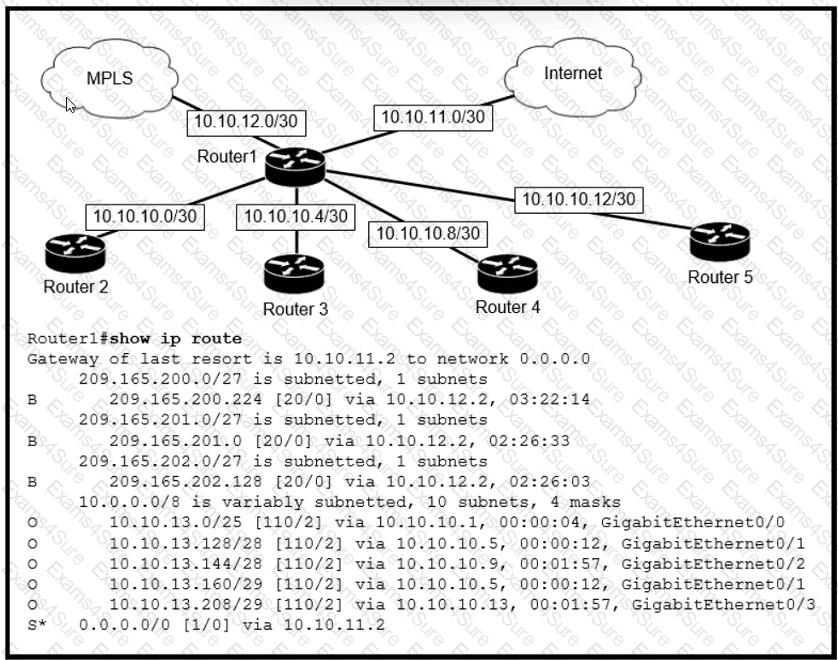
Refer to the exhibit.

Question # 221

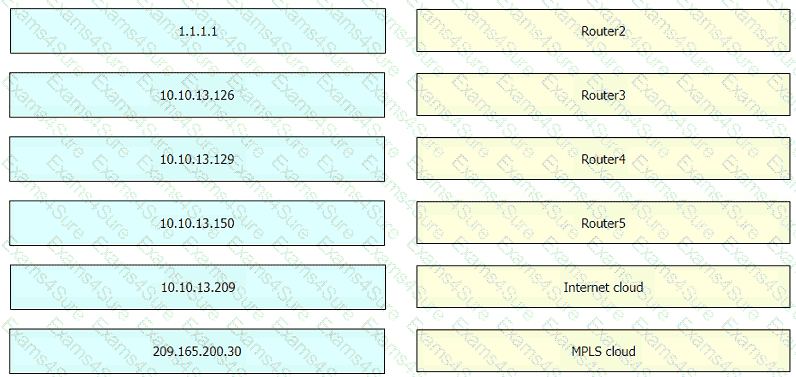
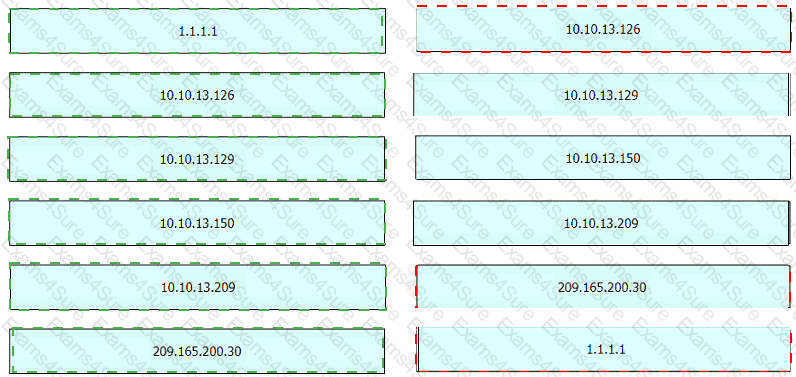
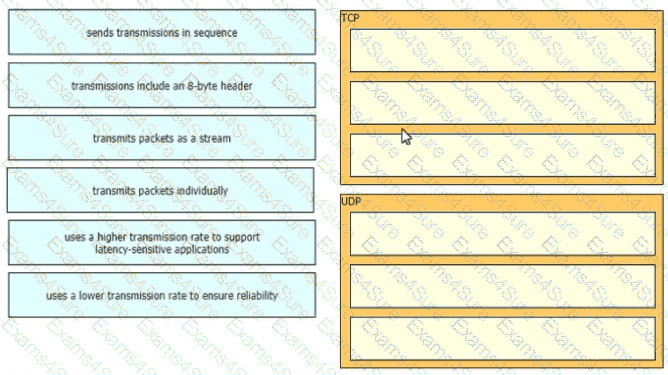
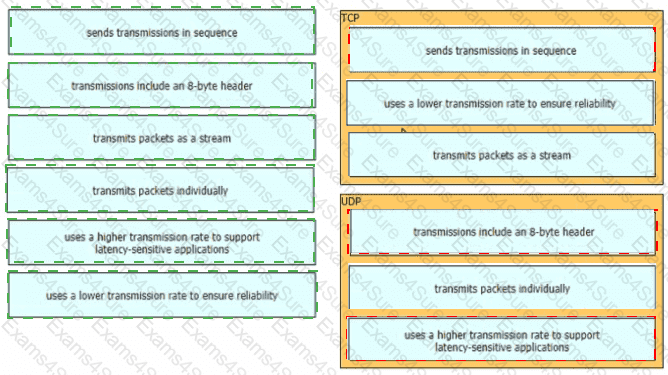
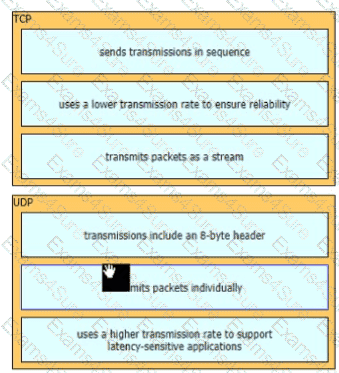
An engineer is configuring the router to provide static NAT for the webserver Drag and drop the configuration commands from the left onto the letters that correspond to its position in the configuration on the right.

Question # 221

Options:

Discussion 0
Question # 222

Which function is performed by the collapsed core layer in a two-tier architecture?

Options:

A.  

enforcing routing policies

B.  

marking interesting traffic for data polices

C.  

attaching users to the edge of the network

D.  

applying security policies

Discussion 0
Question # 223

Which resource is able to be shared among virtual machines deployed on the same physical server?

Options:

A.  

disk

B.  

applications

C.  

VM configuration file

D.  

operating system

Discussion 0
Question # 224

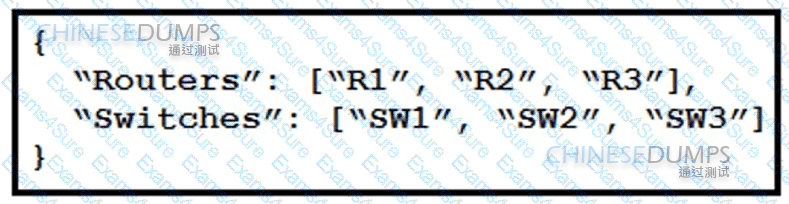
Which two encoding methods are supported by REST APIs? (Choose two)

Options:

A.  

YAML

B.  

JSON

C.  

EBCDIC

D.  

SGML

E.  

XML

Discussion 0
Question # 225

Which switch technology establishes a network connection immediately when it is plugged in?

Options:

A.  

PortFast

B.  

BPDU guard

C.  

UplinkFast

D.  

BackboneFast

Discussion 0
Question # 226

which purpose does a northbound API serve in a controller-based networking architecture?

Options:

A.  

communicates between the controller and the physical network hardware

B.  

reports device errors to a controller

C.  

generates statistics for network hardware and traffic

D.  

facilitates communication between the controller and the applications

Discussion 0
Question # 227

Refer to the exhibit.

Question # 227

Which switch becomes the root bridge?

Options:

A.  

S1

B.  

S2

C.  

S3

D.  

S4

Discussion 0
Question # 228

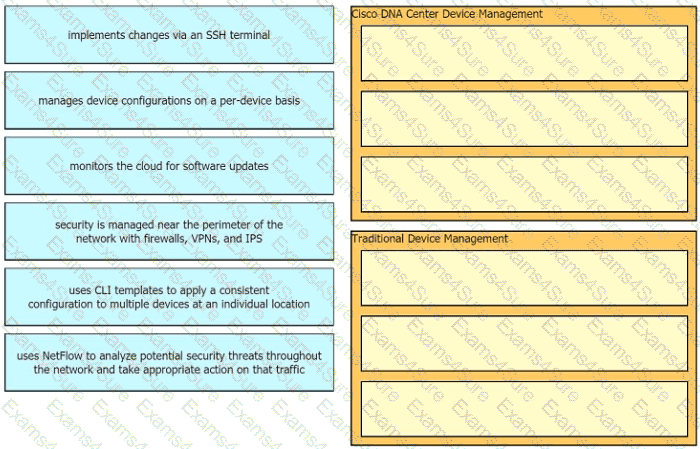
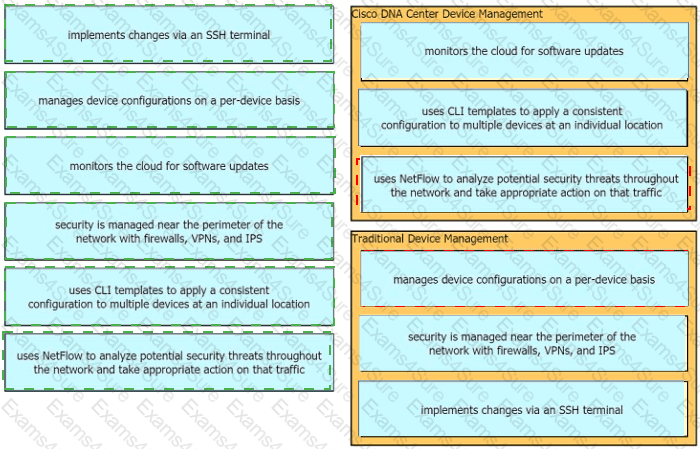
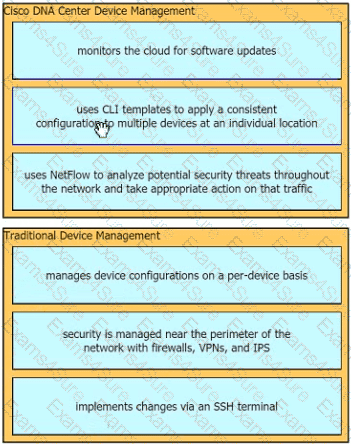
Drag and drop the configuration management terms from the left onto the descriptions on the right. Not all terms are used.

Question # 228

Options:

Discussion 0
Question # 229

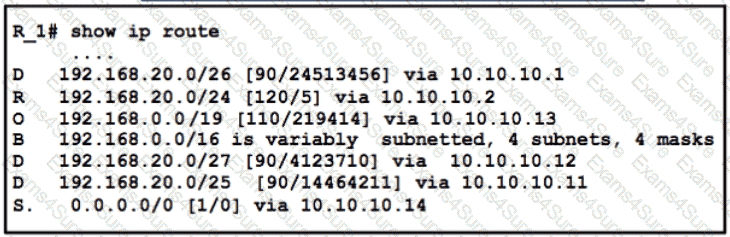
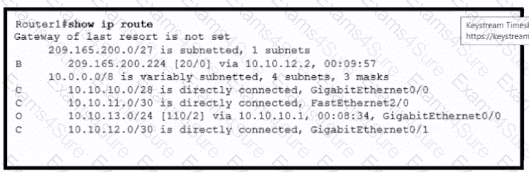
Refer to the exhibit.

Question # 229

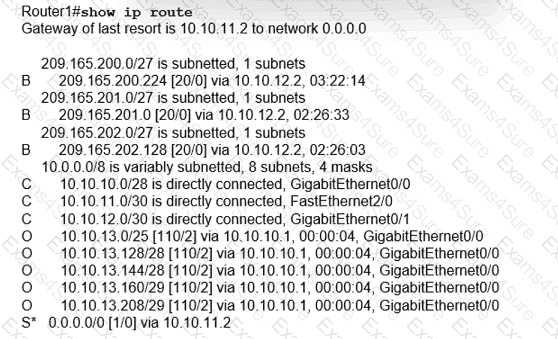
Which two values does router R1 use to identify valid routes for the R3 loopback address 1.1.1.3/32? (Choose two.)

Options:

A.  

lowest cost to reach the next hop

B.  

highest metric

C.  

highest administrative distance

D.  

lowest metric

E.  

lowest administrative distance

Discussion 0
Question # 230

Refer to the exhibit

Question # 230

A network engineer started to configure port security on a new switch. These requirements must be met:

* MAC addresses must be learned dynamically

* Log messages must be generated without disabling the interface when unwanted traffic is seen

Which two commands must be configuredd to complete this task " ? (Choose two)

Options:

A.  

SW(config-if)=switchport port-security mac-address sticky

B.  

SW(config-if)=switchport port-security violation restrict

C.  

SW(config-if)sswitchport port-security mac-address 0010.7B84.45E6

D.  

SW(config-if)switchport port-security maximum 2

E.  

SW(config-if)=switchport port-security violation shutdown

Discussion 0
Question # 231

Question # 231

Refer to the exhibit. An engineer must transtate the PC1 IIP address to 10.199.77.100 and permit PC1 to ping the loopback 0 on router R2. What command set must be used?

A)

Question # 231

B)

Question # 231

C)

Question # 231

D)

Question # 231

Options:

A.  

Option A

B.  

Option B

C.  

Option C

D.  

Option D

Discussion 0
Question # 232

Refer to the exhibit.

Question # 232

How must OSPF be configured on the GigabitEthernet0/0 interface of the neighbor device to achieve.

A)

Question # 232

B)

Question # 232

C)

Question # 232

D)

Question # 232

Options:

A.  

Option A

B.  

Option B

C.  

Option C

D.  

Option D

Discussion 0
Question # 233

Which type of port is used to connect to the wired network when an autonomous AP maps two VLANs to its WLANs?

Options:

A.  

LAG

B.  

EtherChannel

C.  

trunk

D.  

access

Discussion 0
Question # 234

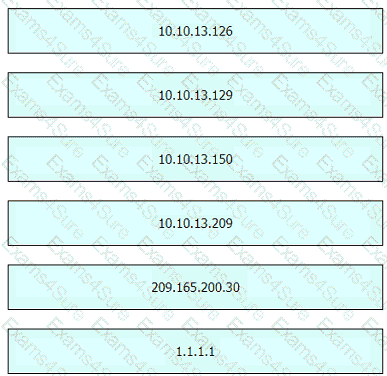
Connectivity between four routers has been established. IP connectivity must be configured in the order presented to complete the implementation. No dynamic routing protocols are included.

1. Configure static routing using host routes to establish connectivity from router R3 to the router R1 Loopback address using the source IP of 209.165.200.230.

2. Configure an IPv4 default route on router R2 destined for router R4.

3. Configure an IPv6 default router on router R2 destined for router R4.

Question # 234Question # 234

Options:

Discussion 0
Question # 235

Question # 235

Three switches must be configured for Layer 2 connectivity. The company requires only the designated VLANs to be configured on their respective switches and permitted accross any links between switches for security purposes. Do not modify or delete VTP configurations.

The network needs two user-defined VLANs configured:

VLAN 110: MARKETING

VLAN 210: FINANCE

1. Configure the VLANs on the designated switches and assign them as access ports to the interfaces connected to the PCs.

2. Configure the e0/2 interfaces on Sw1 and Sw2 as 802.1q trunks with only the required VLANs permitted.

3. Configure the e0/3 interfaces on Sw2 and Sw3 as 802.1q trunks with only the required VLANs permitted.

Question # 235

Options:

Discussion 0
Question # 236

Physical connectivity is implemented between the two Layer 2 switches, and the network connectivity between them must be configured

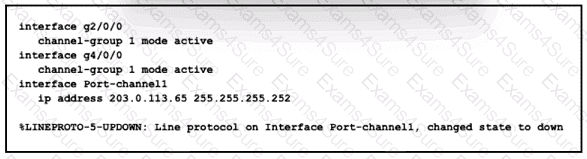
1. Configure an LACP EtherChannel and number it as 1; configure it between switches SW1 and SVV2 using interfaces Ethernet0/0 and Ethernet0/1 on both sides. The LACP mode must match on both ends

2 Configure the EtherChannel as a trunk link.

3. Configure the trunk link with 802.1 q tags.

4. Configure the native VLAN of the EtherChannel as VLAN 15.

Question # 236Question # 236

Options:

Discussion 0
Question # 237

Question # 237

Question # 237

Question # 237

IP connectivity and OSPF are preconfigured on all devices where necessary. Do not make any changes to the IP addressing or OSP

F.  

The company policy uses connected interfaces and next hops when configuring static routes except for load balancing or redundancy without floating static. Connectivity must be established between subnet 172.20.20.128/25 on the Internet and the LAN at 192.168.0.0/24 connected to SW1:

1. Configure reachability to the switch SW1 LAN subnet in router R2.

2. Configure default reachability to the Internet subnet in router R1.

3. Configure a single static route in router R2 to reach to the Internet subnet considering both redundant links between routers R1 and R2. A default route is NOT allowed in router R2.

4. Configure a static route in router R1 toward the switch SW1 LAN subnet where the primary link must be through Ethernet0/1. and the backup link must be through Ethernet0/2 using a floating route. Use the minimal administrative distance value when required.

Options:

Discussion 0
Question # 238

All physical cabling is in place. A company plans to deploy 32 new sites.

The sites will utilize both IPv4 and IPv6 networks.

1 . Subnet 172.25.0.0/16 to meet the subnet requirements and maximize

the number of hosts

Using the second subnet

• Assign the first usable IP address to e0/0 on Sw1O1

• Assign the last usable IP address to e0/0 on Sw102

2. Subnet to meet the subnet requirements and maximize

the number of hosts

c Using the second subnet

• Assign an IPv6 GUA using a unique 64-Bit interface identifier

on e0/0 on Sw101

• Assign an IPv6 GUA using a unique 64-Bit interface identifier

on eO/O on swi02

Guidelines

This is a lab item in which tasks will be performed on virtual devices.

• Refer to the Tasks tab to view the tasks for this lab item.

• Refer to the Topology tab to access the device console(s) and perform the tasks.

• Console access is available for all required devices by clicking the device icon or using

the tab(s) above the console window.

• All necessary preconfigurations have been applied.

• Do not change the enable password or hostname for any device.

• Save your configurations to NVRAM before moving to the next item.

• Click Next at the bottom of the screen to submit this lab and move to the next question.

• When Next is clicked, the lab closes and cannot be reopened.

Question # 238

Options:

Discussion 0
Question # 239

Question # 239

All physical cabling between the two switches is installed. Configure the network connectivity between the switches using the designated VLANs and interfaces.

1. Configure VLAN 100 named Compute and VLAN 200 named Telephony where required for each task.

2. Configure Ethernet0/1 on SW2 to use the existing VLAN named Available.

3. Configure the connection between the switches using access ports.

4. Configure Ethernet0/1 on SW1 using data and voice VLANs.

5. Configure Ethemet0/1 on SW2 so that the Cisco proprietary neighbor discovery protocol is turned off for the designated interface only.

Question # 239

Options:

Discussion 0
Question # 240

Configure IPv4 and IPv6 connectivity between two routers. For IPv4, use a /28 network from the 192.168.1.0/24 private range. For IPv6, use the first /64 subnet from the 2001:0db8:aaaa::/48 subnet.

1. Using Ethernet0/1 on routers R1 and R2, configure the next usable/28 from the 192.168.1.0/24 range. The network 192.168.1.0/28 is unavailable.

2. For the IPv4 /28 subnet, router R1 must be configured with the first usable host address.

3. For the IPv4 /28 subnet, router R2 must be configured with the last usable host address.

4. For the IPv6 /64 subnet, configure the routers with the IP addressing provided from the topology.

5. A ping must work between the routers on the IPv4 and IPv6 address ranges.

Question # 240Question # 240

Options:

Discussion 0
Get 200-301 dumps and pass your exam in 24 hours!

Free Exams Sample Questions